Stellar Cyber Platform (DP) System Requirements and Capacity Planning
This topic helps you provision your Stellar Cyber Platform based on standard daily ingestion volumes in normal use cases. Use this topic to understand the following:
-
What a Stellar Cyber Platform cluster is and why it's important for system performance and capacity.
-
The different types of Stellar Cyber nodes in a cluster, from Data Lake and Data Analyzer Masters to different types of Worker nodes.
-
The quantity of different Stellar Cyber cluster node types required for different daily ingestion volumes.
-
The vCPU, memory, and disk requirements for the virtual machines hosting the different cluster node types.
If you are deploying the Stellar Cyber Platform on a dedicated server running different virtual machines, make sure you guarantee platform performance by observing the rules in Preparing a Server for Stellar Cyber Cluster Deployment.
See the following sections for details:
Note: Refer to Data Durability and Availability in Stellar Cyber for a discussion of best practices related to maintaining data availability.
Understanding Stellar Cyber Clusters and Nodes
When the Stellar Cyber platform is deployed as a cluster, it uses a distributed model that runs the platform’s core data processing and storage services across separate nodes instead of a single system.
In a cluster, the Data Analyzer (DA) and Data Lake (DL) components are deployed as coordinated groups of nodes with defined roles. Master nodes manage coordination, task distribution, and cluster state, while worker nodes perform the actual data processing and storage. This architecture allows the system to operate as a single logical unit while distributing workload across multiple machines.
Cluster deployments allow you to scale up performance by adding additional DL-Worker and DA-Worker nodes to share the workload. Worker nodes communicate with the cluster using a dedicated cluster network.
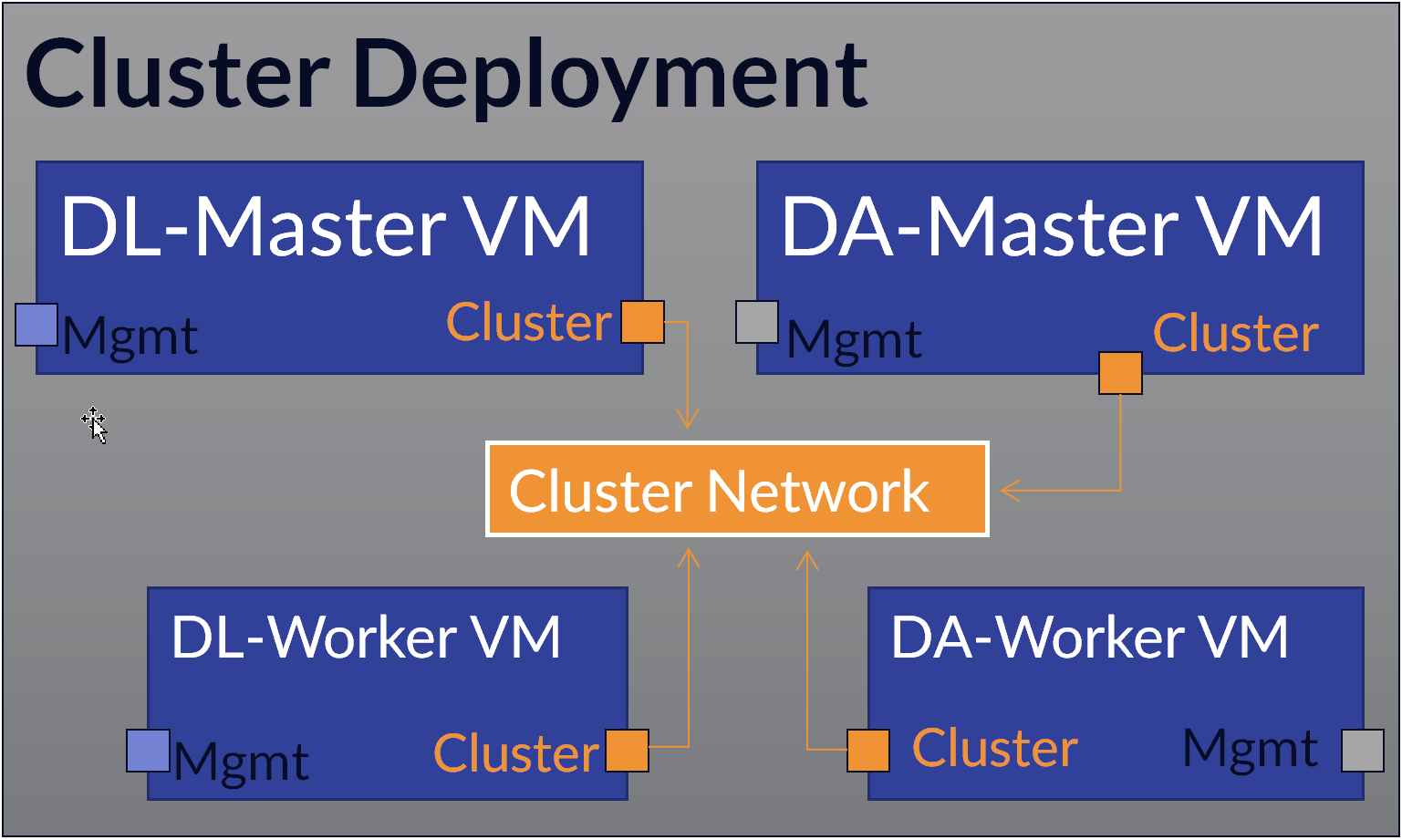
-
Cluster Node Counts by Daily Ingestion Volume provides the counts of DA and DL nodes you need to deploy for different daily ingestion volumes.
-
Cluster Node VM System Requirements provides the minimum specifications for each cluster node type.
Cluster Node Counts by Daily Ingestion Volume
The table below summarizes the number of Stellar Cyber Platform cluster nodes required at different ingestion volumes with baseline numbers of tenants, reports, ATH rules, scheduled reports, and concurrent user sessions.
To use this table, start by estimating your daily ingestion volume. Then, find that value in the table's Daily Ingestion column to understand the number of cluster nodes you'll need to deploy to support it. For example, using the table below, you know that if you want to ingest between 500-750 GB of daily data, you must deploy:
-
One DL Master node with the Maximize Data Storage option disabled.
-
Three DL Worker nodes.
-
One DA Master Node
-
Two DA Worker Nodes
Each of the virtual machines for these nodes must be provisioned with the minimum system resources listed in Cluster Node VM System Requirements.
With this configuration, you can support up to 100 tenants, 70 reports, 250 ATH Playbooks, and 30 concurrent user sessions.
Sizing is baseline only. Additional ingestion, ATH rules, scheduled reports, or concurrent users beyond the baselines shown below require additional resources. Contact Stellar Cyber support for assistance.
| Daily Ingestion | Data Lake Nodes |
Maximize Data Storage (MDS) Option* |
Data Analyzer Nodes |
Tenants |
Reports |
ATH Playbooks |
Concurrent User Sessions |
|---|---|---|---|---|---|---|---|
| Less than or equal to 250 GB | 1 × DL Master |
Enabled |
1 × DA Master |
50 |
50 |
200 |
20 |
| 250–500 GB | 1 × DL Master + 1 DL Worker |
Enabled |
1 × DA Master + 1 DA Worker |
75 |
60 |
225 |
25 |
| 500–750 GB | 1 × DL Master + 3 DL Workers |
Disabled |
1 × DA Master + 2 DA Workers |
100 |
70 |
250 |
30 |
| 750–1000 GB | 1 × DL Master + 4 DL Workers |
Disabled |
1 × DA Master + 3 DA Workers |
125 |
80 |
275 |
35 |
|
1000–1250 GB |
1 × DL Master + 5 DL Workers + 1 DL Coordinating Node |
Disabled |
1 × DA Master + 4 DA Workers |
150 |
90 |
300 |
40 |
| 1250–1500 GB | 1 × DL Master + 6 DL Workers + 1 DL Coordinating Node |
Disabled |
1 × DA Master + 5 DA Workers |
175 |
100 |
325 |
45 |
*The MDS option specifies whether the node stores data itself (enabled) or only manages storage and search operations (disabled). When you scale up to three or more DL-worker nodes, you disable MDS on the DL-Master and provision it with less disk space. The DL-worker nodes have MDS enabled and handle the actual storage while the DL-master provides storage management and search.
You can also deploy the DP as an "all-in-one," with both the DL Master and DA Master on a single virtual machine with support for up to 50 GB of daily ingestion. Refer to the All-in-One rows in the tables below for system specifications.
Cluster Node VM System Requirements
The table below provides the minimum system requirements for each of the different types of nodes in a Stellar Cyber Platform cluster. Once you've used the table in the previous section to identify the quantities of different cluster nodes you need to support your target ingestion, you can use the information in this section to provision the virtual machine resources for each of those nodes.
For example, if you're provisioning the two Data Analyzer Worker nodes required for daily ingestion of 500-750 GB in a private cloud deployment, you know from the table below that each of those nodes must be provisioned with 40 vCPUs, 64 GB of memory, and a 750 GB OS disk.
Stellar Cyber only supports full-SSD deployments. Spinning-disk-based storage (HDD) and hybrid drives (SSHD) are not supported. All deployments must adhere to this SSD-only policy in order to qualify for performance guarantees and technical support.
Refer to Stellar Cyber Requires Full SSD Disks for further details.
Different System Requirements for Different Target Environments
The minimum system requirements for a cluster node virtual machine are different depending on whether you are deploying in a public cloud environment (such as AWS, OCI, or GCP) or in a private cloud environment on a single-tenant virtualization host, such as a VMware ESXi server.
Private cloud and public cloud VM requirements differ because they are based on different provisioning models.
-
In private cloud environments, you define exact CPU, memory, and storage values because you control the underlying infrastructure.
-
In public cloud environments, you usually choose from predefined instance types, which bundle resources into fixed configurations.
Because these instance types do not always match private cloud specifications exactly, public cloud requirements for AWS and Azure are expressed as the closest supported instance sizes rather than identical resource values.
VM Specifications for Private Cloud Deployments (Single-Tenant Virtualization Host)
The table below provides the minimum system requirements for cluster node virtual machines when deploying in a private cloud environment on a single-tenant virtualization host such as a dedicated ESXi server:
| Cluster Node Type | Form Factor |
vCPU |
Memory |
SSD Disk 1 (OS) |
SSD Disk 2 (Data) |
|---|---|---|---|---|---|
| Data Analyzer Master | Virtual Machine | 40 | 96 GB | 750 GB | N/A |
| Data Analyzer Worker | Virtual Machine | 40 | 64 GB | 750 GB | N/A |
| Data Lake Master | Virtual Machine | 44 | 156 GB | 1 TB |
|
| Data Lake Worker | Virtual Machine | 44 | 132 GB | 750 GB | 8–16 TB |
| Data Lake Coordinating Node | Virtual Machine | 40 | 96 GB | 750 GB | N/A |
|
All-in-One (AIO) |
Virtual Machine |
44 |
156 GB |
1 TB |
8-16 TB |
VM Specifications for Public Cloud Deployments (AWS, Azure, GCP, OCI)
The table below provides the minimum system requirements and instance types for cluster node virtual machines when deploying in a public cloud environment, such as AWS, Azure, GCP, or OCI.
| Node Role | Memory | CPU | SSD Disk 1 (OS) |
SSD Disk 2 (Data) |
AWS Instance Type | Azure Instance Type | GCP Instance Type | OCI Instance Type |
|---|---|---|---|---|---|---|---|---|
| Data Analyzer Master | 96 GB | 32 | 750 GB |
N/A |
m6i.8xlarge
32 vCPUs, 128 GiB RAM |
Standard_D32s_v5
32 vCPUs, 128 GiB RAM |
Custom VM | E4/E5.Flex |
| Data Analyzer Worker | 64 GB | 32 | 750 GB |
N/A |
m6i.8xlarge
32 vCPUs, 128 GiB RAM |
Standard_D32s_v5
32 vCPUs, 128 GiB RAM |
Custom VM | E4/E5.Flex |
| Data Lake Master | 156 GB | 32 | 1000 GB |
|
r6i.8xlarge
32 vCPUs, 256 GiB RAM |
Standard_E32s_v5
32 vCPUs, 256 GiB RAM |
Custom VM | E4/E5.Flex |
| Data Lake Worker | 128 GB | 32 | 750 GB + 8-16 TB data storage | 8–16 TB | m6i.8xlarge
32 vCPUs, 128 GiB RAM |
Standard_D32s_v5
32 vCPUs, 128 GiB RAM |
Custom VM | E4/E5.Flex |
| Data Lake Coordinating Node | 95 GB | 32 | 750 GB |
N/A |
m6i.8xlarge
32 vCPUs, 128 GiB RAM |
Standard_D32s_v5
32 vCPUs, 128 GiB RAM |
Custom VM | E4/E5.Flex |
| AIO | 156 GB | 32 | 1000 GB | 8–16 TB | r6i.8xlarge
32 vCPUs, 256 GiB RAM |
Standard_E32s_v5
32 vCPUs, 256 GiB RAM |
Custom VM | E4/E5.Flex |
Capacity Planning for Physical Appliances
The table below lists the number of physical appliances you need to deploy to achieve different daily ingestion volumes:
-
All deployments include one Data Analyzer Master appliance.
-
You scale up your deployment with additional appliances to support the daily ingestion volumes shown in the table. The additional appliances operate as the Data Lake Master and Workers according to the proportions in Cluster Node Counts by Daily Ingestion Volume.
|
Daily Ingestion |
Data Replication |
Data Analyzer Master Appliance |
Data Node Appliances (Data Lake Master, Data Lake Workers, Data Analyzer Workers) |
Reports |
Playbooks |
Tenants |
Concurrent Sessions |
|---|---|---|---|---|---|---|---|
|
300 GB |
No |
1 |
1 |
100 |
1000 |
50 |
15 |
|
600 GB |
No |
1 |
2 |
200 |
2000 |
100 |
30 |
|
900 GB |
No |
1 |
3 |
300 |
3000 |
150 |
45 |
|
1200 GB |
No |
1 |
4 |
400 |
4000 |
200 |
60 |
|
1500 GB |
No |
1 |
5 |
500 |
5000 |
250 |
75 |
|
1800 GB |
No |
1 |
6 |
600 |
6000 |
300 |
90 |
|
2100 GB |
No |
1 |
7 |
700 |
7000 |
350 |
105 |
|
400 GB |
Yes |
1 |
2 |
200 |
2000 |
100 |
30 |
|
600 GB |
Yes |
1 |
3 |
300 |
3000 |
150 |
45 |
|
800 GB |
Yes |
1 |
4 |
400 |
4000 |
200 |
60 |
|
1000 GB |
Yes |
1 |
5 |
500 |
5000 |
250 |
75 |
|
1200 GB |
Yes |
1 |
6 |
600 |
6000 |
300 |
90 |
|
1400 GB |
Yes |
1 |
7 |
700 |
7000 |
350 |
105 |
|
1600 GB |
Yes |
1 |
8 |
800 |
8000 |
400 |
120 |
|
1800 GB |
Yes |
1 |
9 |
900 |
9000 |
450 |
135 |
|
2000 GB |
Yes |
1 |
10 |
1000 |
10000 |
500 |
150 |
Data Sinks and Capacity Planning
If you enable a data sink in your deployment, it is crucial that you do not exceed the guidelines in the tables in this topic and provision sufficient DA nodes for your anticipated ingestion. Do not exceed 300 GB of daily ingestion per DA node.
Data sink performance depends heavily on I/O bandwidth between DA nodes and the data sink itself and adding a data sink can reduce DA performance by 30-40%. Because of this, you should anticipate loading your DA nodes with no more than the maximum of 300 GB of daily ingestion per node described in the tables above when a data sink is enabled. If your current configuration exceeds this per-DA load, add additional DA nodes to your cluster before enabling a data sink.
