Providing Feedback to Alert Auto Triage
The Alert Auto Triage feature requires an add-on license, which you can request from your Stellar Cyber Partner Success representative. In on-premises deployments, this feature is available through the Early Access Program. Contact your Partner Success representative to enroll. On-premises deployments also require outbound connectivity from the deployment to the Stellar Cyber cloud AI services; for details, see Providing Feedback to Alert Auto Triage.
Alert Auto Triage is part of the Stellar Cyber Human-Augmented Autonomous SOC model, which combines automation with human oversight. Stellar Cyber classifies alerts before you review them and supplies the evidence behind each verdict. If the evidence supports the verdict, no further action is required; simply leave the verdict unchanged. If the verdict is incorrect, you can override it and provide context. Your feedback also helps the system evaluate similar alerts in the future.
This topic explains how your feedback influences the Stellar Cyber Platform and how to make that feedback effective. The value of your feedback depends on its importance, scope, and specificity, and feedback from more experienced analysts has greater influence on the AI.
The following are the sections in this topic:
Why Your Feedback Matters
Your handling of an AI-generated verdict provides feedback. Leaving the verdict unchanged indicates that you agree with the AI assessment, while overriding it provides an explicit correction. When you provide a justification with an override, Stellar Cyber can apply that context to similar future alerts so it aligns with your operational environment and detection policies. Over time, this reduces repeated noise and directs your attention to alerts that require investigation.
Stellar Cyber provides scale and consistency, while you provide the judgment, environmental knowledge, and context that the AI cannot infer on its own. Clear feedback helps Stellar Cyber apply that knowledge to future alerts.
The Pyramid of Influence
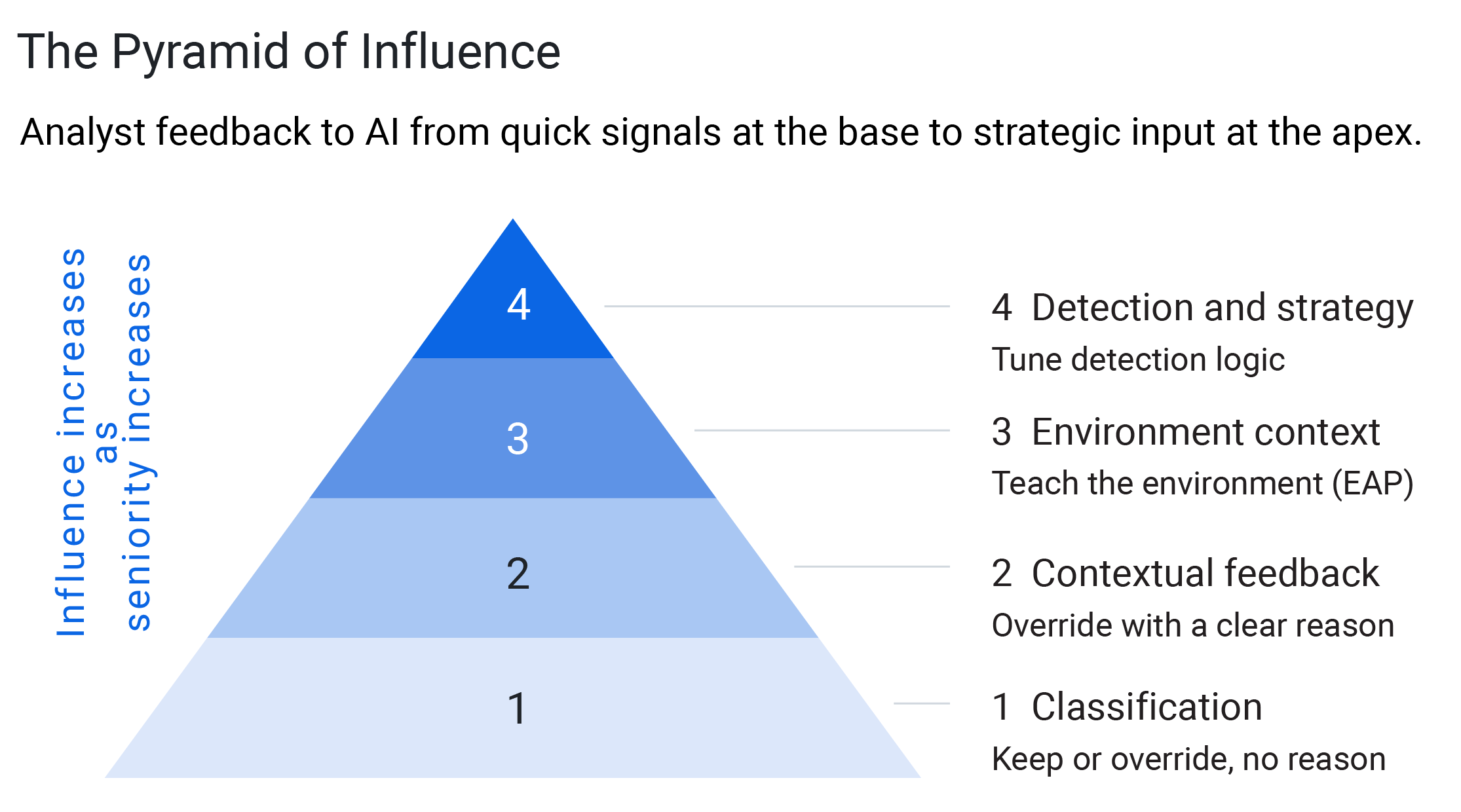
Not all feedback carries the same weight. The Pyramid of Influence describes levels of analyst feedback from the base (quick, low-influence signals) to the apex (high-influence, strategic input). Higher levels require more context and convey more analyst expertise to the Stellar Cyber Platform.
|
Level |
Feedback |
Influence |
Typical Analyst |
|---|---|---|---|
| 1 – Classification | Leave the AI verdict unchanged, or override it without a meaningful justification | Lowest – Leaving a verdict unchanged signals agreement with the AI assessment; an override without a meaningful justification corrects one alert but provides little reusable context. | Any analyst |
| 2 – Contextual feedback | Override and provide a clear justification — select applicable suggestions, add context, or both | Higher – Stellar Cyber records the justification and applies the context to similar future alerts. | Tier 1–2 |
| 3 – Environmental context |
Provide broader, proactive context about the environment (assets, segments, expected behavior) Note: Requires participation in the Early Access Program (EAP). |
Broad – This influences how future alerts across the tenant are judged. | Tier 2–3 |
| 4 – Detection and strategy | Tune detection logic, thresholds, and strategy | Highest – This changes how detections behave at the source. | Tier 3 / Detection engineering |
Two principles follow from this model:
-
Higher levels have greater influence. Leaving a verdict unchanged or overriding it without a meaningful justification has limited influence; a well-supported justification or a piece of environment context can change how Stellar Cyber judges an entire class of future alerts.
-
Analyst experience corresponds to influence. A more senior analyst typically operates higher on the pyramid. Junior analysts review and correct; experienced analysts contextualize, and detection engineers shape the logic itself.
This topic focuses on Levels 1–3, where most day-to-day analyst work occurs.
What Makes Feedback Effective
Three qualities determine how useful feedback is to the Stellar Cyber Platform:
-
Importance – Feedback is most valuable for recurring or high-impact patterns that you expect to see again. A one-time alert rarely needs to become durable knowledge.
-
Scope – Feedback can apply to a single alert, a specific asset or account, or the whole tenant, such as for a compliance obligation. Match the feedback to the appropriate scope so Stellar Cyber generalizes it correctly and does not over- or under-apply it.
-
Specificity – Provide precise, self-contained feedback. Clear, standalone reasoning provides the Stellar Cyber Platform with more useful context than a vague note. For example, compare "svc-backup runs nightly jobs across the file servers; high-volume SMB between them is expected" with "looks fine" or "known good".
Effective feedback must also remain current. Environments change, and previously valid knowledge can become outdated. Stellar Cyber applies an expiration to learned context so you can renew or update it as your environment evolves. For details, see Managing Institutional Knowledge.
Verdicts and What Is Expected for Each
Alert Auto Triage assigns one of four verdicts to each alert, and an overall verdict to the case. The verdict identifies the AI conclusion and points to the supporting evidence so you can determine what action to take. The Stellar Cyber does not automatically close, score, or contain anything based on a verdict. You determine the appropriate action.
|
Verdict |
What It Means |
What Is Expected of You |
|---|---|---|
| True Positive | Confirmed malicious or policy-violating activity that requires investigation or response. | Prioritize and investigate these alerts, then take or automate a response. If the evidence supports the verdict, leave it unchanged; otherwise, override it. |
| Benign True Positive | The detection was correct and the activity really occurred, but it is authorized and expected — for example, administrative maintenance. | Close the alert with context that explains why the activity is expected so Stellar Cyber can treat the pattern as benign in the future. |
| False Positive | Normal or authorized activity that resembled a detection pattern but is not a real threat. | If the evidence supports the verdict, leave it unchanged. Review these alerts regularly, and override an incorrect verdict with clear reasoning. |
| Inconclusive | Stellar Cyber found insufficient or conflicting evidence to reach a confident verdict. | Investigate further, then set the correct verdict and explain your reasoning. |
Where to focus first: Prioritize True Positive and Inconclusive alerts because they carry the most risk and the greatest need for a human decision. Also review False Positive and Benign True Positive alerts regularly: correcting unsupported verdicts and providing context for recurring patterns are high-value feedback that refines future triage.
Verdicts and Scores Are Independent
A verdict is not the same as a case score. The score is deterministic—derived from detection and behavioral scoring—and a verdict never changes it. As a result, a case can carry a high score (for example, 99) and still receive a False Positive verdict. The score reflects potential severity, while the verdict reflects the AI assessment of whether the activity is a real threat. Treat the verdict as advisory input to your judgment, not as an automatic action.
What Stellar Cyber Does and Does Not Do Automatically
Automation in the Stellar Cyber Autonomous SOC has defined limits. The following limits apply regardless of your configuration:
-
Verdicts and scores stay separate. The score is deterministic; a verdict does not change it.
-
AI output is advisory. Summaries, findings, and recommendations are inputs to your judgment. Nothing is automatically closed or suppressed based on a verdict or its strength.
-
Responses require an analyst action or a configured rule. A response occurs only when an analyst takes an action or when an Automated Threat Hunting (ATH) rule you configured fires. The Stellar Cyber does not automatically respond to, close, score, or contain a case on its own.
Automatically closing alerts based on a verdict is not currently available.
Providing Feedback: Verdict Override
If a verdict is correct, no UI action is required; leaving it unchanged serves as a soft confirmation. If a verdict is incorrect, override it at the alert level. Each override requires a reason. When you override alerts within a case, Stellar Cyber automatically re-evaluates the case verdict.
To provide effective override feedback:
-
Navigate to Cases and select a case name to open the case details.
-
In the Associated Alerts table, select the More Info icon for the alert.
-
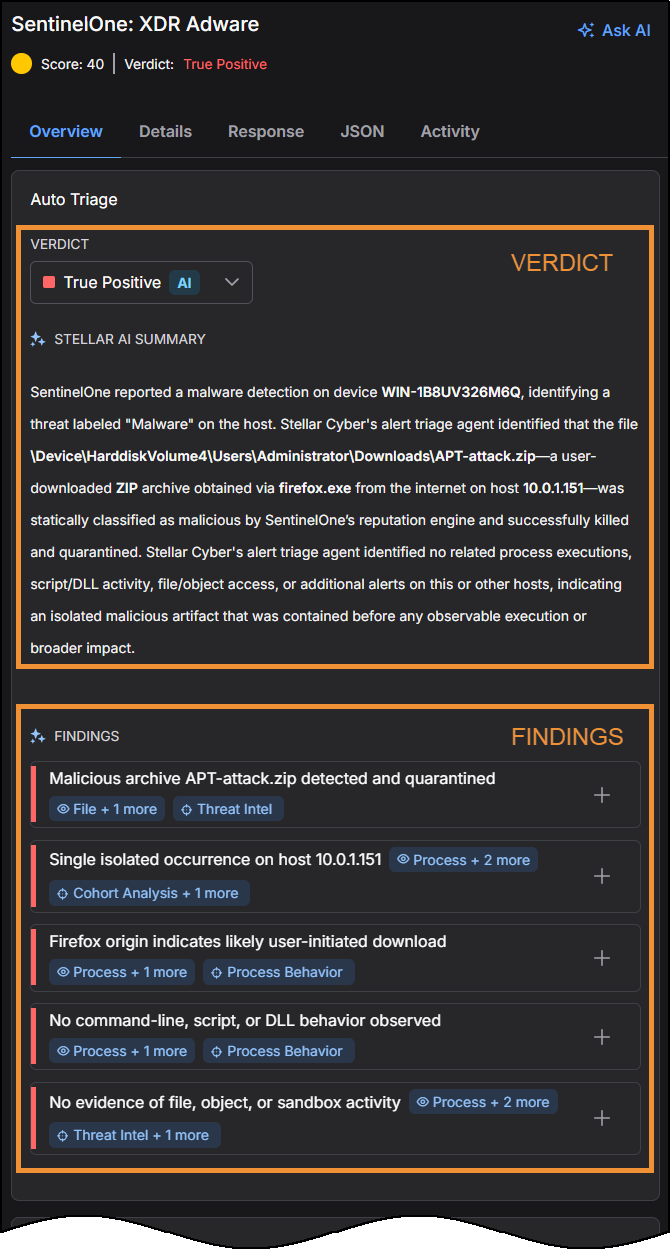
In the Overview tab, review the Findings section to understand the reasoning and evidence behind the verdict.
-
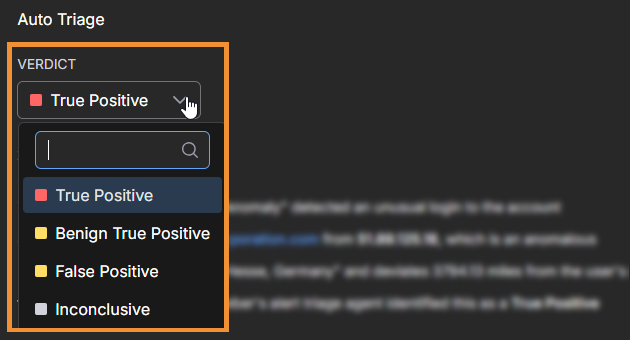
If the verdict is incorrect, expand the Verdict drop-down list and choose the correct one.
-
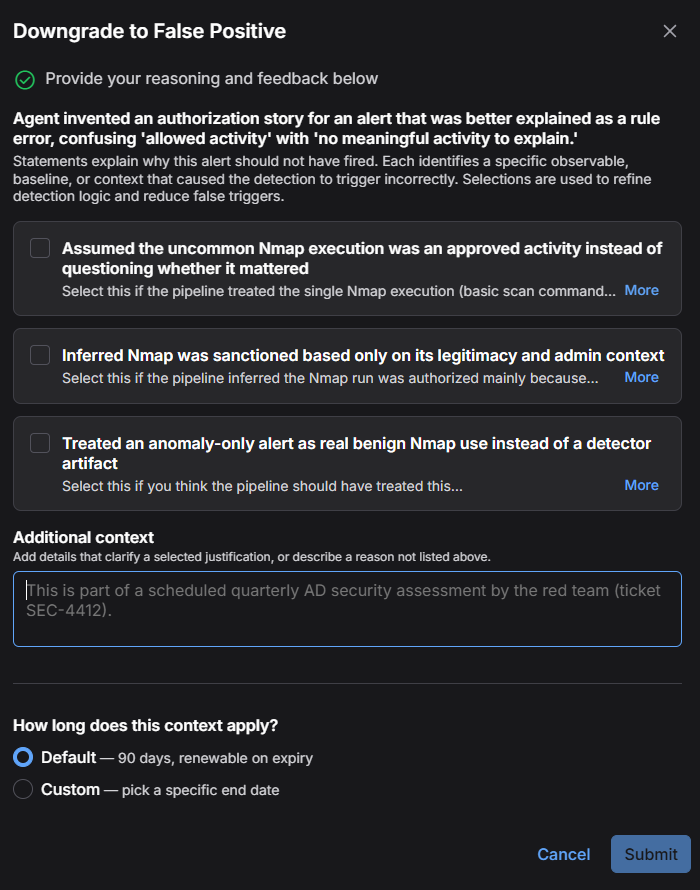
In the dialog box that appears, provide your reasoning. Submit becomes available after you select at least one justification suggestion or enter text under Additional context.
-
Select any justification suggestions that apply or provide your own. Stellar Cyber generates possible reasons for changing the verdict of this specific alert and ties each one to concrete evidence (see About the Justification Suggestions). You can select one or more auto-generated reasons or, if none of them apply, leave them unselected and enter your own reason under Additional context.
-
If you select one of the auto-generated reasons, you can optionally add further details under Additional context.
-
Under How long does this context apply?, keep the Default (90 days, renewable on expiry) or choose Custom to set a specific end date.
-
-
Select Submit.
The quality of your reasoning determines its value: a clear, specific reason moves your feedback from Level 1 to Level 2 on the Pyramid of Influence — the difference between correcting a single alert and teaching Stellar Cyber a reusable rule. Whether you select a suggestion or write your own, make the reasoning clear to another analyst reviewing it later: state what the activity is, why it is expected (or genuinely malicious), and any condition that bounds it, such as a schedule, host role, or known destination.
About the Justification Suggestions
When you override a verdict, Stellar Cyber offers justification suggestions to help you record why. The dialog identifies the direction of the override, for example, Escalate to True Positive or Downgrade to False Positive. Select the suggestions that apply to your environment, add further detail under Additional context, or provide your own explanation.
Where the suggestions come from. Stellar Cyber generates the suggestions in real time for the specific alert you are reviewing; they are not selected from a fixed list. The Stellar Cyber Platform analyzes the alert evidence, such as the hosts, IP addresses, signatures, ports, processes, and other observables involved, together with the direction of your override, and proposes statements tailored to that alert. For example, when you downgrade a verdict to False Positive, the suggestions are written to show why the activity might not be malicious. When you escalate a verdict to True Positive, they identify evidence that might undermine a benign determination. Select only the statements that apply to your environment. If Stellar Cyber cannot generate suggestions for an alert, you can still provide your own reason.
How the suggestions influence future verdicts. When you submit the override, your selected justifications and any additional context are saved and associated with the evidence involved. On a similar future alert, Stellar Cyber applies this reasoning when it evaluates the alert, informing the resulting verdict and confidence. This feedback is advisory: it informs the AI assessment, but you retain final authority over the verdict. The context applies for the period you select under How long does this context apply? — Default (90 days, renewable on expiry) or a Custom end date — after which it expires unless renewed.
All overrides are logged and auditable, and might be surfaced in reporting.
Using Verdicts in Your Workflow
You can use verdicts throughout the Stellar Cyber Platform, not only within individual alerts.
-
See verdicts in context. The verdict appears in the alert details and can be added as a column in the Alert Table and in Threat Hunting, so you can filter and sort by it outside of a single case.
-
Drive automation with verdicts. A verdict can be used as a condition in an Automated Threat Hunting (ATH) rule; for example, to take an action when an alert is given a True Positive verdict. This lets you use the AI assessment to drive a response while retaining control over the resulting action.
Getting Help from AI Assistance
AI Assistance is a natural-language chat panel available within a case and for individual alerts that helps you understand and act on verdicts. Use it to ask why a case received its verdict and score, to summarize findings and cite the alerts behind them, to query live events (for example, "where did this user log in from?"), and to explore alternative explanations for activity.
AI Assistance reads and reasons over evidence that Alert Auto Triage has already assembled. It does not take actions, such as blocking, closing, reassigning, or re-triggering triage. As with any large language model, verify its answers. AI Assistance is currently available in English only.
When to Rely on Human Judgment
Automation handles routine, high-confidence decisions, while human judgment remains essential for rare, sensitive, or ambiguous situations. These can include insider-threat concerns, policy exceptions, novel behavior, or decisions with significant business impact. Stellar Cyber keeps you in the loop when a signal is borderline or a behavior is new. Review the verdict against the evidence. Leave it unchanged when supported, or override it when the evidence does not support it. Providing clear reasoning with an override helps capture your judgment for future alerts.
Best Practices
-
When you override a verdict, select applicable justification suggestions and add specific context when needed. This turns a correction into reusable context.
-
Provide feedback for recurring patterns rather than one-time events.
-
Match feedback to its scope. Be explicit about whether something is true for one asset, one account, or the whole tenant.
-
Be specific and self-contained. Provide context that stands on its own, including the condition that bounds it.
-
Keep context current. Revisit and renew learned context as your environment changes; retire what is no longer true.
-
Encourage experienced analysts to contribute contextual and environment-level feedback, where their expertise has the most impact.
-
Provide broad data-source coverage. Verdict depth depends on integration depth, and limited evidence typically reflects limited data sources. Broader data-source coverage produces more confident, better-supported verdicts.
For how automated verdicts are generated and how to run and review triage, see the Alert Auto Triage topic.
