ITDR Alerts Dashboard
The ITDR Alerts Dashboard provides a consolidated analysis of the identity-based security alerts and events in your environment. Use it to review identity threat activity as a whole before you drill into an individual alert, and to see at a glance which users, hosts, and tenants are most affected.
To open the dashboard, select Dashboards | CREATION | Dashboards and locate ITDR Alerts Dashboard in the Explore section. The dashboard is also listed in the All Dashboards table under the General category.
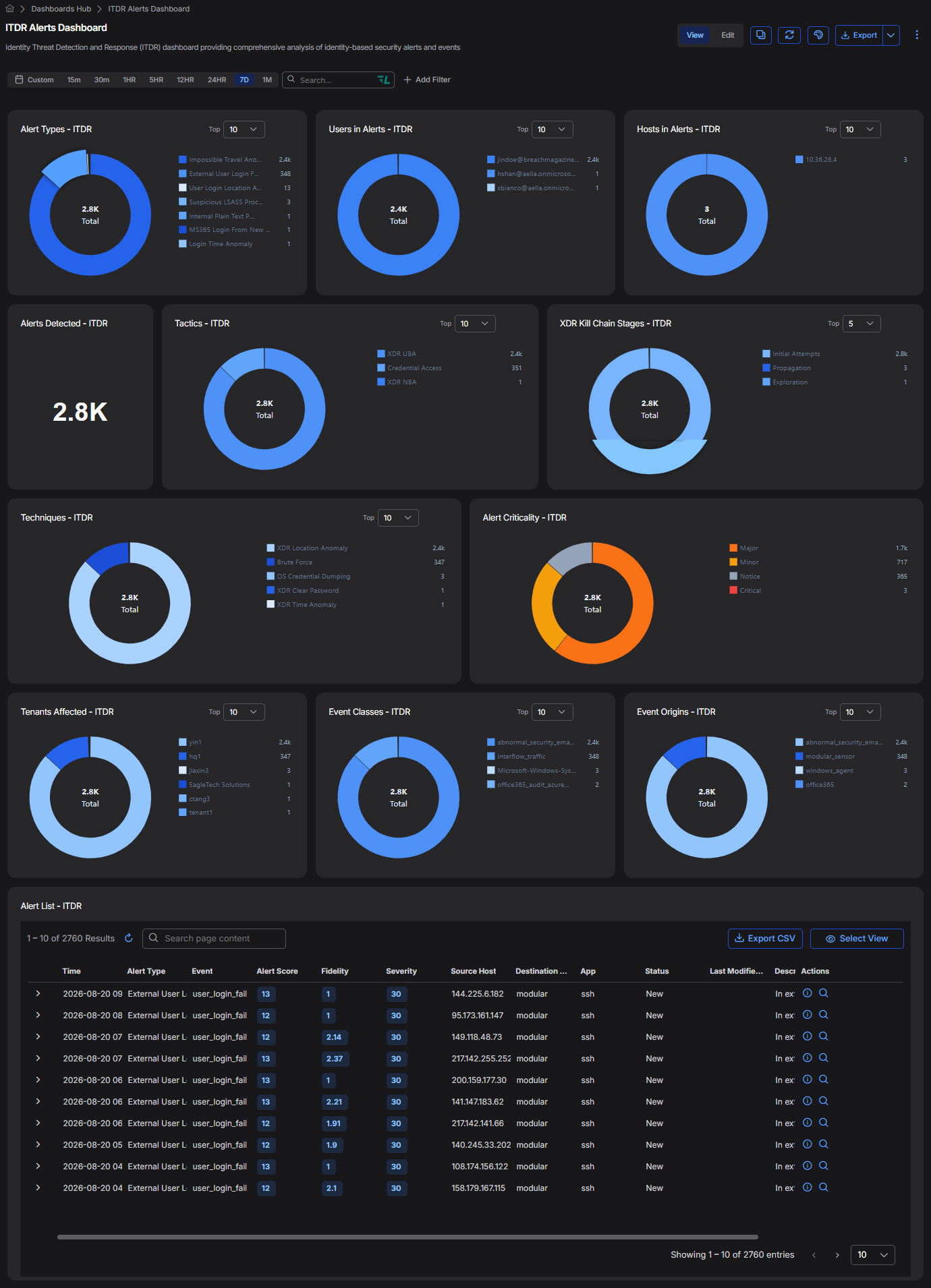
This dashboard reports on the alert types that Stellar Cyber classifies as identity detections. For a description of each identity alert type, see Machine Learning Alert Type Details.
The data in this display includes only the alerts that match the current filter settings. See the Filters page for more information.
By default, the predefined dashboards show All Open alerts. You can use the filters at the top of the page to change which alerts are displayed.
The dashboard includes the following sections:
Each chart includes a Top selector that controls how many values appear in the legend. Increase this value when a chart is dominated by a single high-volume alert type and you want to see the smaller contributors.
Alert Volume and Criticality
These two sections establish the overall scale of identity threat activity in the selected time interval.
-
Alerts Detected – ITDR – The total number of identity alerts detected in the selected time interval. Use this number as the baseline for the remaining sections, all of which break the same total down along a different dimension.
-
Alert Criticality – ITDR – The distribution of identity alerts across the Critical, Major, Minor, and Notice criticality levels. Each level corresponds to a range of alert scores (Critical ≥ 75, Major 50–75, Minor 25–50, Notice < 25). A small number of Critical alerts against a large volume of Minor and Notice alerts is typical, and the Critical count is usually the most productive starting point for an investigation.
Alert Types
The Alert Types – ITDR chart breaks the total down by identity alert type, such as Impossible Travel Anomaly, External User Login Failure Anomaly, or Suspicious LSASS Process Access.
Identity alert volume is frequently concentrated in a small number of high-frequency types. Review the smaller slices as well as the largest ones, because low-volume types such as credential dumping often carry more investigative value than a high volume of failed logins.
Affected Users, Hosts, and Tenants
These sections identify which identities and systems the alerts involve.
-
Users in Alerts – ITDR – The user accounts appearing most often in identity alerts. Select a user in Assets | User Behavior Analytics to review the risk score, activity status, and logon history for that account. See User Behavior Analytics.
-
Hosts in Alerts – ITDR – The hosts appearing most often in identity alerts. A single host accounting for a disproportionate share of the total often indicates a domain controller, a jump host, or a system involved in credential access activity.
-
Tenants Affected – ITDR – The distribution of identity alerts across tenants. This section is most useful in partner and MSSP deployments, where it shows which tenants are generating identity threat activity. See Understanding Tenants.
Attack Classification
These sections describe identity alerts in terms of the stage and method of the attack rather than the alert type.
-
XDR Kill Chain Stages – ITDR – The distribution of identity alerts across XDR Kill Chain stages, such as Initial Attempts, Exploration, and Propagation. Activity that has progressed beyond the earliest stages warrants closer attention, because it suggests that an identity has already been used rather than merely targeted. See Understanding the XDR Kill Chain.
-
Tactics – ITDR – The distribution of identity alerts across tactics, such as Credential Access, XDR UBA, and XDR NBA.
-
Techniques – ITDR – The distribution of identity alerts across techniques, such as Brute Force, OS Credential Dumping, and XDR Location Anomaly.
Event Classes and Event Origins
These sections show where the underlying data came from, which is the fastest way to identify a coverage gap.
-
Event Classes – ITDR – The classes of event that contributed to the identity alerts, such as interflow_traffic or office365_audit_azure.
-
Event Origins – ITDR – The data sources that contributed to the identity alerts, such as modular_sensor, windows_agent, and office365.
If an identity source that you have connected does not appear in Event Origins, the source might not be sending the events that identity detections require. Review the connector configuration and, for Windows Server Sensors, confirm that the sensor profile collects the necessary channels. See Templates for Windows Server Sensors.
Alert List
The Alert List – ITDR table lists the individual identity alerts behind the charts above. Each row includes the following:
-
Time – The time at which the alert was created.
-
Alert Type – The identity alert type.
-
Event – The
xdr_event.namevalue for the alert type in the Interflow record. -
Alert Score, Fidelity, and Severity – The scoring values for the alert. See Alert Scoring.
-
Source Host and Destination Host – The hosts involved in the alert.
-
App – The application associated with the alert.
-
Status – The current triage status of the alert.
-
Last Modified – The time of the most recent change to the alert.
-
Description – A summary of what the alert detected.
-
Actions – Controls for opening the alert details and for searching on the alert.
Expand a row to see the supporting detail for that alert. Select Export CSV to export the current result set, or Select View to change which columns appear. See the Tables page for more information on working with tables.
Dashboard Actions
You can edit, clone, refresh, and export this dashboard using the controls at the top right of the page. See Dashboard Actions for details on each action.
