Stellar Cyber Architecture
 Learn more at Stellar Cyber Academy.
The following links take you to courses on the Stellar Cyber Academy technical training portal where you can learn more about this topic by watching the suggested lessons.
 F02 Open XDR Architecture Overview (01h:11m)
The Big Picture (08m:00s)
F02 Open XDR Architecture Overview (01h:11m)
The Big Picture (08m:00s)
Explore the high-level architecture of the Stellar Cyber Platform through a system diagram. Understand how components like data analysis, machine learning, and cloud integration interact to create a unified security operations framework.
Open XDR Platform (25m:00s)
Explore key features of the Stellar Cyber Platform, including data processing, storage, and essential functions like Interflow, data normalization, enrichment, and machine learning. Learn how these elements integrate to support efficient threat detection, security operations, and response workflows.
Modular Sensors (15m:00s)
Learn about Modular Sensors, which gather data from security, identity, and infrastructure tools across the network. Understand their roles in log collection, traffic analysis, IDS functionality, malware detection, and coordinating responses in both cloud and on-premises environments.
Server Sensors (08m:00s)
Discover how Windows and Linux server sensors capture and forward server-specific events to the Stellar Cyber Platform. See how these sensors convert server events into Interflow records to enhance detection accuracy across threat monitoring and incident response.
Data Collection Overview (10m:00s)
Review how Stellar Cyber collects, normalizes, and enriches data from a wide range of sources across the enterprise. Follow the data pipeline from initial ingestion to storage in the data lake, enabling comprehensive threat detection and advanced response capabilities.
J04 Open XDR Investigation Tools (04h:47m)
Data Collection, Interflow, and Indices (25m:00s)
Discover how the Stellar Cyber Platform collects, normalizes, and enriches data into Interflow records within the Data Lake. Learn to organize data using indices like alerts, traffic, syslog, and Windows events to enhance search and filtering capabilities. Explore data processing, enrichment with threat intelligence, and indexed storage for fast retrieval.
Interflow Dictionary to Find Indices to Use in Search (15m:00s)
Use the Interflow dictionary to locate relevant indices and field names for precise search queries. Identify values for fields like source IP type, destination country, and event source in Investigate | Threat Hunting for more targeted searches.
Interflow Dictionary to Find Field Values (08m:00s)
Explore the Interflow dictionary to find specific field values within indices. Use this tool to accurately query values in fields such as source IP address reputation, geo-location, and event status, enhancing dashboards and filters for threat detection.
Searching Data in the Stellar Cyber Platform (01h:38m)
Learn how to apply regular expressions in search queries and validate them with the Interflow dictionary. This demo covers locating patterns in fields such as usernames, IP addresses, and hostnames.
F03 Open XDR User Interface Overview (03h:30m)
User Interface Overview (12m:00s)
Explore high-level interactions available in the Stellar Cyber Platform, including UI, console access, and API, then watch a demonstration of each in action. Learn how to navigate the data processor, connect modular and server sensors, and configure sensor connections using security certificates to maintain secure data flows. Follow along as key elements of the data pipeline are covered, from managing platform settings to supporting smooth security operations across environments.
Top Right Question to User (30m:00s)
Discover the resources accessible from the question mark icon in the top right of the Stellar Cyber Platform, including the knowledge base, learning portal, and support options. Explore a demonstration of how contextualized links adjust based on your current view in the UI, enabling quick and targeted resource lookup. Learn to navigate documentation, product feedback channels, and the Stellar Cyber Academy to find answers and connect with the broader Stellar Cyber community.
Menu Bar (20m:00s)
Explore the Stellar Cyber Platform menu bar and learn how its core sections — cases, alerts, visualize, investigate, respond, and system — connect you to key features such as dashboards, threat hunting tools, and response automation. Watch a demonstration of menu bar navigation and discover how available options differ between on-premises and SaaS deployments, with features like alerts, Case Management, visualize, and system configured according to your deployment environment.
Filters, Search, and Time (27m:00s)
Explore the core tools for filtering and querying data in the Stellar Cyber Platform: filters, search, and time. Learn how these tools work together to sift through large volumes of data from the data lake, enabling you to isolate and analyze security events based on specific criteria. Follow a demonstration applying Lucene syntax for precise queries, adjusting time filters, and working with toolbar filters to access targeted data views across the platform.
Pie and Bar Charts (22m:00s)
Learn how to interpret, navigate, and manipulate pie and bar charts within the Stellar Cyber Platform. Explore how these visual tools support real-time analysis by revealing data distribution and trends across the data lake. Discover how to customize chart displays, interact with various data visualizations, and drill down into specific data points for granular detail, or broaden your view for overarching insights.
Tables (40m:00s)
Discover the features of data tables in the Stellar Cyber Platform UI and learn how they support SOC analysts and administrators in navigating and interpreting security data. Follow a detailed demonstration covering how to sort, filter, and organize data within table views, including techniques for working with large data sets drawn from the data lake. Explore toolbar filters and the search tool to refine results and surface meaningful information, and learn how to customize table displays to improve situational awareness and operational efficiency during threat analysis workflows.
Alert Details (33m:00s)
Explore the alert details view to investigate individual alerts within the Stellar Cyber Platform. Learn to navigate key alert components, including alert scores, source IP, and correlated events, then watch how linked data fields and threat intelligence context support deeper analysis. Follow along with a hands-on demonstration that builds practical skills for investigating and responding to alerts effectively.
Interflow Dictionary and Cases (24m:00s)
Learn how to use the Interflow dictionary and Case Management features within the Stellar Cyber Platform. Explore how Interflow records connect raw logs to alerts, and follow along with a practical demonstration on tracing events across the data lake for in-depth security investigations. Discover how to link related alerts into cases and use Case Management to streamline threat handling and improve investigative efficiency.
Other Interfaces - CLI and API (26m:00s)
Explore the command-line interface (CLI) and API options available in the Stellar Cyber Platform, and learn how these alternative interfaces support configuration, automation, and integration with external systems. Watch demonstrations of both the CLI and API in action, and follow along as key configuration and automation options are applied programmatically. Discover how to interact with the Stellar Cyber Platform beyond the standard UI to enhance flexibility, streamline workflows, and connect with external data sources including the data lake for deeper data integration.
The first time you access a link on the portal during a session, you must log in to access content.
Stellar Cyber is a unified platform for Security Operations, providing a central location to gather and organize security threat information by unifying together key data, tools and alerts for analysis. Stellar Cyber also automates both threat detection (using AI and machine learning) and response (using automated threat hunting). This helps reduce the noise so you aren't overwhelmed by the amount of information and can find and focus on the real threats. You can even teach the machine learning to present only the information that truly interests you.
High Level View
The essential first step in implementing security is to gather information. The following figure shows the conceptual model and components that Stellar Cyber uses in the collection phase.
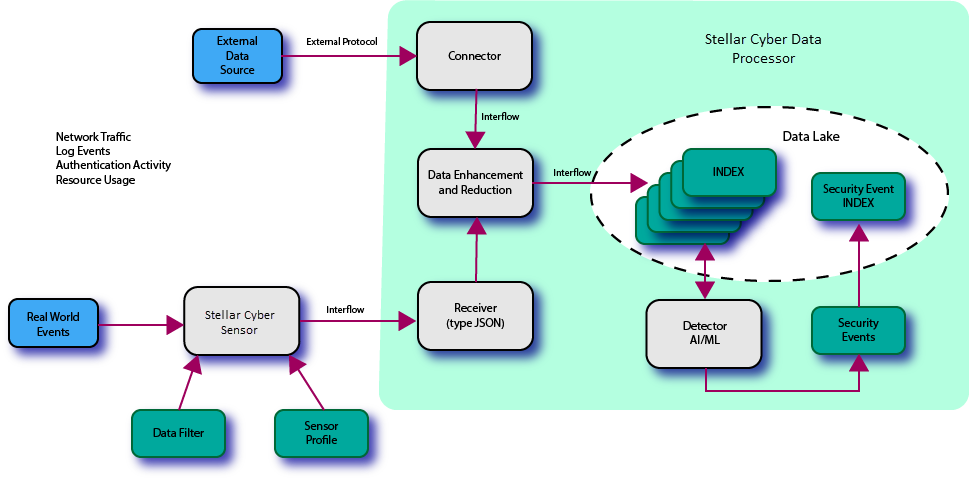
As with any monitoring system the data flow starts with real-world events. The following explains the functions and roles of each major element in the diagram.
- Stellar Cyber Sensor – There can be any number of sensors in the network. There are also different types of sensors as described in the sections below. Regardless of the type the basic function is the same: When observed events occur, the sensor generates Interflow records and sends them to a receiver. Sensors are discussed in greater detail in a section below.
- Receiver – This is a task running in the DP that passively listens for input from sensors. There can be any number of receivers instantiated in the system and each one may serve any number of sensors. There are currently two types of receivers: packet and JSON. The JSON form is used to process Interflow records from sensors. It defines the IP address and port number that sensors use to connect to the DP. The packet form of receiver (not shown in the figure above) is used to receive raw network packet data from a security sensor.
- Connector – Similar to a receiver, except that it's active, a connector is also a software task. It actively collects information from an external data source and generates Interflow records. There can be any number of connectors configured but one is required for each external data source. There are several different types of connectors, each developed for a different type of data source. Connectors are discussed in a section below in greater detail.
- Data Lake and Indices – The Data Lake is the repository of the information that Stellar Cyber stores. The data is organized into indices, which are categories that Stellar Cyber uses to group data. The indices help make searching much more efficient and effective. An index that stores information directly from the sensors or collectors is referred to as a "raw" index. The security index contains enhanced data based on data from one or more of the raw indices.
- Machine Learning – Stellar Cyber uses machine learning and AI to examine the records in the Data Lake and make a determination of whether it sees evidence of a security breach. When breaches are detected, Stellar Cyber generates alerts. Alerts are reported in the Detections | Alerts page and the home dashboard. In addition, Stellar Cyber stores alert records in a special index. There are many different types of machine learning algorithms, each programmed to look for a different class or type of threat.
Together, these components collect information and store it in the Data Lake on a continuous basis, organized in a form suitable for security breach detection.
User Interface
The DP runs an embedded web server that any browser with sufficient capability can use. The system supports any number of connections on the standard TCP ports for the https protocol.
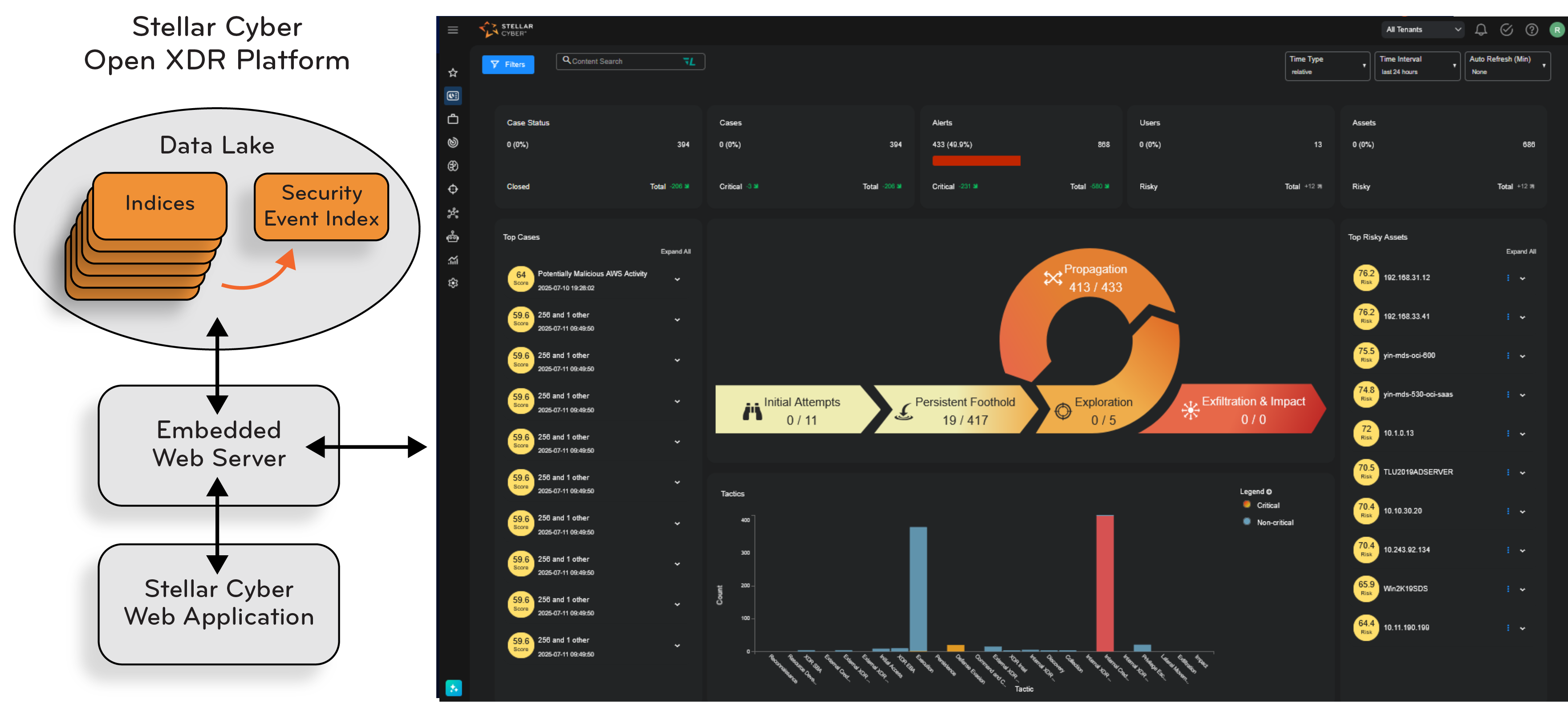
After the initial download of the JavaScript application, all further communication with the DP consists of REST API calls to fetch data and issue commands. The REST API is proprietary.
Although there are no requirements to use a specific browser, Stellar Cyber strongly recommends that you configure your browser settings to allow multiple file downloads before exporting data from the user interface. This ensures that all files are successfully exported.
Interflow
Interflow is the record format used by Stellar Cyber to represent raw data, events, and anomalies. On the network, Interflow is expressed as a JSON object (sometimes referred to as a "hash") that can contain a large variety of keys. The values stored by each key can be any form of object (string, number, or other object).
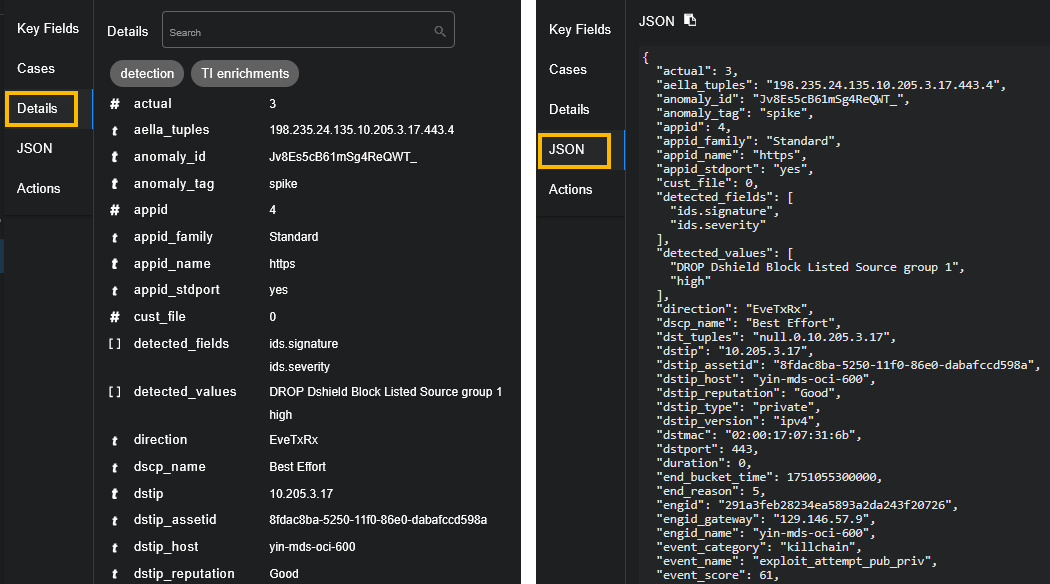
The Event Display component can display the Interflow record in either tabular or raw JSON form. A key purpose of the Interflow record is to provide evidence for an event of interest. The extensible nature of the Interflow record is used by Stellar Cyber to implement its data enhancement and machine learning (ML) functions. The ability to add fields during its life cycle is also used to adapt connectors that contain new definitions. As a result Interflow is future-proofed and able to handle new requirements when needed.
Although the names of the keys are largely intuitive for security analysts, a dictionary of the Interflow keys can be found on its own Interflow page. The Interflow Dictionary function on the Threat Hunting screen also provides a list of Interflow keys to choose from when searching for threats in the Data Lake. The list of keys will evolve with new versions of Stellar Cyber.
Sensors
Sensors are the components that collect information from key points in the monitored network, compose Interflow records, and send them to the DP. There are several different types of sensors, each with different capabilities and suited for individual environments. The types include the following:
- Linux Server Sensor – This agent runs within a compatible Linux distribution environment. It is usually configured with a preset maximum amount of resources it can use (for example, no more than 5% of CPU resource) and can collect many different types of information including logs and command execution events.
- Windows Server Sensor – This agent runs within the Windows environment. The current version exclusively looks at Windows events supported by the Microsoft-defined APIs. Many different threats can be observed from this interface.
-
Modular Sensor – Modular Sensors let you customize the features you want on the sensor, allowing you to scale VM requirements. Modular sensors can be configured with the following features: Log Forwarding, Network Traffic ingestion, Sandbox, IDS, Aggregator, and tenable.io Nessus scans.
Previous releases also included Network and Security sensors. The features associated with these sensors can all be enabled in the Modular Sensor Profile for a Modular Sensor. For your convenience, here is how Stellar Cyber defined Network and Security sensors in previous releases:
-
Network Sensor – A network sensor is dedicated to collecting network packets and compiling them into Interflow records to be sent to a receiver.
-
Security Sensor – This type of sensor has the capabilities of a network sensor with additional security features integrated, including IDS and sandboxing. A security sensor can also send packet data to the DP.
-
Although all sensors are ultimately software components that can be run in compatible hosts and hypervisor environments, they can also be packaged in purpose-built hardware for convenience in deployment.
Sensors capture data via the following methods:
- Port mirrors
- Network taps
- Virtual network taps
- Agents
- VXLAN
- GRE
- Logs
- Netflow/IPFIX
Sensors are automatically recognized by Stellar Cyber when they are installed and programmed with the IP address of the DP (this is referred to as the CM, or Configuration Manager, by the sensor). Once recognized, the sensor must be authorized by the Stellar Cyber Configuration Manager. The process of authorization assigns a license to the sensor. See the Sensor Overview page to see how this is done and for links to how you configure sensors, sensor profiles, and filters.
To see which alert types you can get with each sensor, refer the Stellar Cyber alert coverage page.
Encrypted Traffic
Stellar Cyber does not directly decrypt traffic but can handle it in multiple ways:
- Deploy agents behind proxies
- Detect applications
- Partner with third-party decryption
Deploying Agents Behind Proxies
The Stellar Cyber sensor doesn't need to decrypt traffic when you deploy it behind your proxy server. The traffic is already decrypted by the proxy server when it gets to the sensor, and the sensor can add user and process context to the traffic.
Detecting Encrypted Applications
If you cannot deploy the sensor behind the proxy servers or you are not using proxy servers, Stellar Cyber network sensors can still identify encrypted applications by analyzing the encrypted traffic patterns and TLS/SSL handshaking.
The sensor extracts useful metadata, such as the server certificate, IP addresses, domain names, session duration, and byte counts from the packet header and TLS/SSL handshaking. The IP addresses are enriched with geolocation, threat intelligence, host name, user name, and more, to create rich context for alerts and actions. Our machine learning based network traffic analysis and user behavior analysis apply to the encrypted traffic with the extracted metadata and enriched context. In addition, JA3 fingerprinting is used to identify malware with encrypted traffic.
Partnering with Third-Party Decryption Tools
Stellar Cyber sensors work with many third-party decryption tools, such as F5 SSL Orchestration and Gigamon VAF, taking the decrypted traffic and analyzing it.
Connectors
As with sensors, connectors are a method of collecting information based on real world events and compiling them into Interflow records directed at the Data Lake. There are several connector categories in Stellar Cyber. For the protocols that are supported by a commercial vendor, each interface is supported for the purpose of enhancing the security of their own services.
Connectors are tasks that run within the DP itself. Each connector class uses a protocol defined by the external data source and requires configuration with IP address and authorization credentials.
Assets
An asset is a server, router, host system that appears in the private network being monitored by Stellar Cyber. Assets are automatically registered in Stellar Cyber by sensors. The information used to identify them include MAC address, IP Address, and host name (if available). They can be de-authorized or ignored by user command if needed. Hosts outside the private network are not considered assets. Using the Asset Analytics screen, the user can examine assets for threat data and also examine performance history.
Alerts
Alerts are a critical component the ability of Stellar Cyber to discover important events in a sea of data. Using ML techniques as well as algorithms developed over long experience, Stellar Cyber examines raw event data for evidence of security breaches. Insignificant events are passed over and sifted for anomalies. When anomalies are found, Stellar Cyber generates alerts that are entered into the Alerts Index and reported in the Stellar Cyber user interface.
Alerts help drive the action in the home dashboard, the Alert Types page, and the Cases interface. Stellar Cyber uses AI to score the alerts to help you prioritize actions and responses.
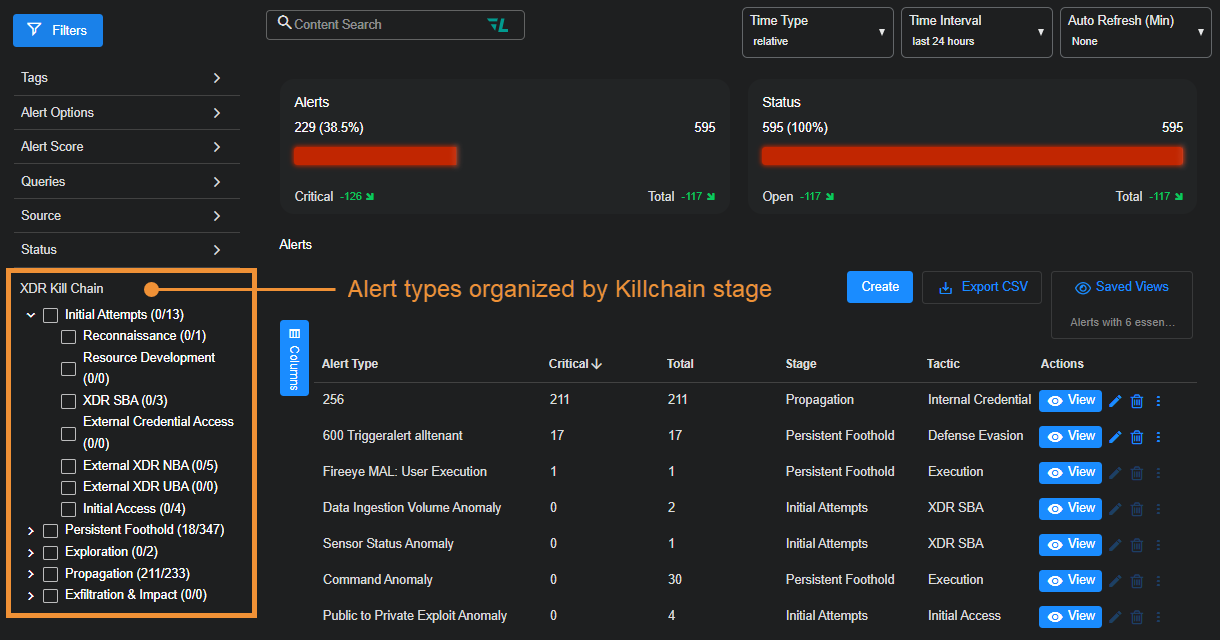
There are many different types of alerts available in Stellar Cyber, organized by XDR Kill Chain Stage, Tactic, and Technique, with each focused on a specific type of security threat. The figure below shows the organization of the alerts in the Alert Types page.
Cases
Stellar Cyber also leverages ML to correlate disparate alerts into a coalesced case.
A case is a set of multiple correlated alerts and entities constituting a potential unified security attack, ranked by a dynamically updated score indicating the severity of the attack. Stellar Cyber uses its machine-learning capabilities to generate cases automatically, grouping related alerts into a unified case for improved attack resolution.
Stellar Cyber reports cases in the Home dashboard, as well as in the Case Management interface, giving you a powerful tool to organize and respond to security events.
Firewall Actions
Stellar Cyber has the capability of interfacing with firewall rules. Once configured, the Stellar Cyber can mitigate security breaches by blocking malicious traffic as soon as it is identified. Two modes supported include:
- You can manually trigger a firewall action from the event display.
- An Automated Threat Hunting Playbook may specify a firewall response to be taken automatically when some condition is met.
