Virtual Modular Sensor Provisioning and Performance
This article describes the resources required for the successful installation and operation of Stellar Cyber virtual modular sensors. Virtual modular sensors install as dedicated VMs with Stellar Cyber software pre-installed.
Refer to the following sections for details:
What Determines Sensor Performance?
Virtual modular sensor performance depends on the following key factors:
-
Allocated VM resources (CPU and Memory). Sensor performance scales with CPU and RAM.
-
Enabled features (Log Forwarder, Network Traffic, Sandbox, and IDS).
-
Traffic volume (both peak and sustained events per second, connections per second, and bandwidth usage).
More features, deeper inspection, and more traffic always require more CPU and RAM.
Sensor Provisioning Rules
Guarantee your virtual modular sensor performance by following these rules for sensor provisioning:
-
The minimum recommended sensor configuration is 4 virtual CPU cores and 8 GB of RAM. Refer to Sensor Provisioning by Module for detailed provisioning requirements for different modules.
-
Stellar Cyber recommends that you provision at least 2 times as much memory as the number of CPU cores to ensure stable performance. So, for example, if you provision 8 CPUs, you should provision at least 8 x 2 = 16 GB of memory.
-
Do not set CPU or memory limits on the sensor virtual machine.
Leave CPU Limit and Memory Limit set to Unlimited for the Modular Sensor virtual machine. Limits cap the resources the VM can consume and can significantly degrade sensor performance even when the host has CPU and memory available. Reserve resources instead to guarantee them for the sensor.
-
Use ≥2.1 GHz processors for validated performance.
-
Provision sensor disk space using the rules in Provisioning Disk Space for Virtual Modular Sensors.
-
Stellar Cyber limits the number of log sources you can point at a given sensor as follows:
-
Sensors with 8 GB or less of memory accept a maximum of 100 log sources.
-
Sensors with more than 8 GB of memory accept a maximum of 200 log sources.
Log sources beyond the limit are aggregated under the special source IP address of 0.0.0.0.
-
As a simple rule, more traffic and inspection depth require more CPU and memory.
Sensor Provisioning by Module
Stellar Cyber provides virtual modular sensors using specific modules. This section lists the provisioning you must provide to achieve the performance for your purchased module. See the sections below for details.
Stated specifications support the corresponding maximum network traffic inspection throughput. Performance may vary depending on your environment, configuration, and other variables.
Network-Module Sensor Specifications
The Network-Module sensor specifications assume a span port, local file assembly, packet forwarding, log forwarding, and Network Traffic. The Malware Sandbox and IDS features are not enabled.
Virtual machines for the Network-Module sensors must be provisioned as follows:
| Component | Network-Module-1G | Network-Module-10G |
|---|---|---|
| Virtual Cores (reserved) | 8 | 32 |
| RAM (GB) (reserved) | 16 | 64 |
| Maximum throughput (Gbps) (1 or 2 span ports) |
Up to 1.0 | Up to 10.0 |
| Log Forwarder Events/s | 7,000 | 10,000 |
Security-Module Sensor Specifications – IDS Only
The Security-Module IDS sensor specifications assume a span port, local file assembly, log forwarding, Network Traffic, and IDS. The Malware Sandbox feature is not enabled.
Virtual machines for the Security-Module sensors must be provisioned as follows:
| Component |
Security-Module-200M IDS |
Security-Module 500M IDS |
Security-Module 1G IDS | Security-Module 10G IDS |
|---|---|---|---|---|
| Virtual Cores (reserved) |
4 |
8 |
16 | 32 |
| RAM (GB) (reserved) |
8 |
16 |
64 | 64 |
| Maximum throughput (Mbps) (1 or 2 span ports) |
Up to 200 |
Up to 500 |
Up to 1,000 | Up to 10,000 |
| Log Forwarder Events/s |
1,500 |
1,500 |
7,000 | 10,000 |
Security-Module Sensor Specifications – IDS and Sandbox
The Security-Module sensor specifications assume a span port, local file assembly, log forwarding, Network Traffic, Malware Sandbox, and IDS.
Virtual machines for the Security-Module IDS sensors must be provisioned as follows:
| Component |
Security-Module-200M |
Security-Module-500M |
Security-Module-1G | Security-Module-10G |
|---|---|---|---|---|
| Virtual Cores (reserved) |
4 |
8 |
16 | 32 |
| RAM (GB) (reserved) |
8 |
16 |
64 | 64 |
| Maximum throughput (Mbps) (1 or 2 span ports) |
Up to 200 |
Up to 500 |
Up to 1,000 | Up to 10,000 |
| Log Forwarder Events/s |
1,500 |
1,500 |
7,000 | 10,000 |
Checking Enabled Features on the Sensor
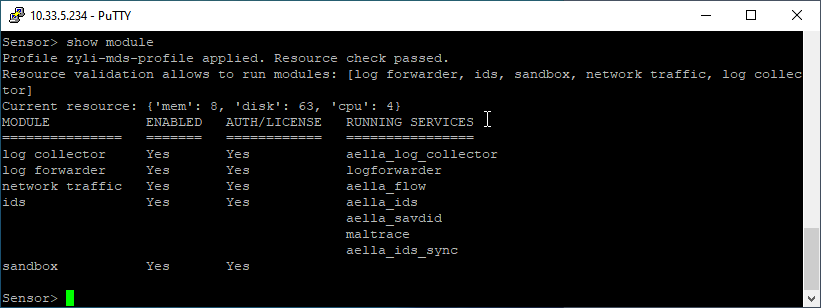
You can see which features are currently enabled on a sensor, as well as its current provisioning by using the show module command in the Sensor CLI. For example:
Stellar Cyber Provisioning Recommendations
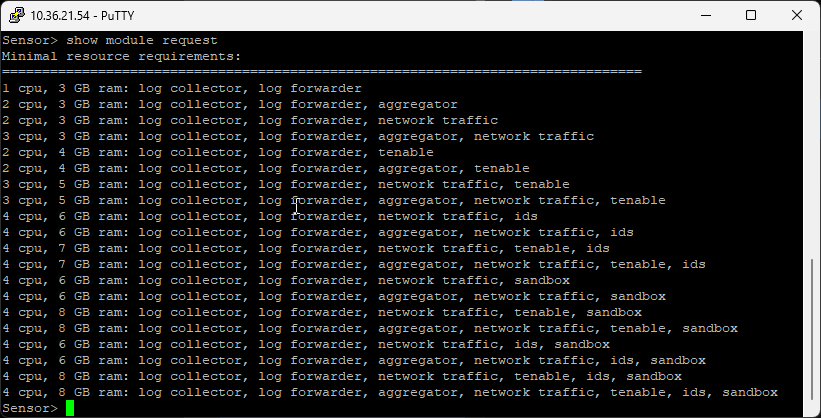
You can see the most recent provisioning guidance from Stellar Cyber by using the show module request command in the Sensor CLI. For example: