Configuring Bitdefender Log Ingestion
The Bitdefender API does not support pull of data collection. Instead, you configure a Bitdefender Push event for JSON RPC messages to send data to Stellar Cyber Modular Sensor configured to ingest HTTP JSON over TLS. All data is ingested to the Syslog index.
The Bitdefender PUSH functionality is supported for HTTPS listeners. This requires the Stellar Cyber sensor be enabled for TLS, which affects all ports, not just the one used for Bitdefender.
The steps below explain how to configure Bitdefender GravityZone to push logs to a Stellar Cyber Modular Sensor and how to configure your Stellar Cyber deployment accordingly.
- Enable Deployment for TLS and HTTP JSON
- Obtain a Bitdefender API Key and Endpoint URL
- Configure the Bitdefender Push Script
- Run the Push Script
- Verify the Configuration (Optional)
Enable Deployment for TLS and HTTP JSON
-
Select System | DATA SOURCE MANAGEMENT | Sensors | Sensors.
-
Select for the Modular Sensor you want to configure for ingesting TLS.
The Edit Sensor Parameters panel appears.
-
Enable Syslog TLS Enabled.
-
Select Submit.
-
Select System | DATA SOURCE MANAGEMENT | Sensors | Sensor Profiles.
The Sensor Profile list appears.
-
Select for the sensor profile associated with the sensor you modified above.
The Edit Sensor Profile window appears.
-
Expand the section for Log Forwarder.
-
Enable the option for HTTP JSON Parser as shown below.

-
Open TCP port 5200 on your firewall.
Obtain a Bitdefender API Key and Endpoint URL
To configure the push script, you need the following information from your GravityZone Console account:
-
Access URL (to create API Endpoint URL)
-
API Key
-
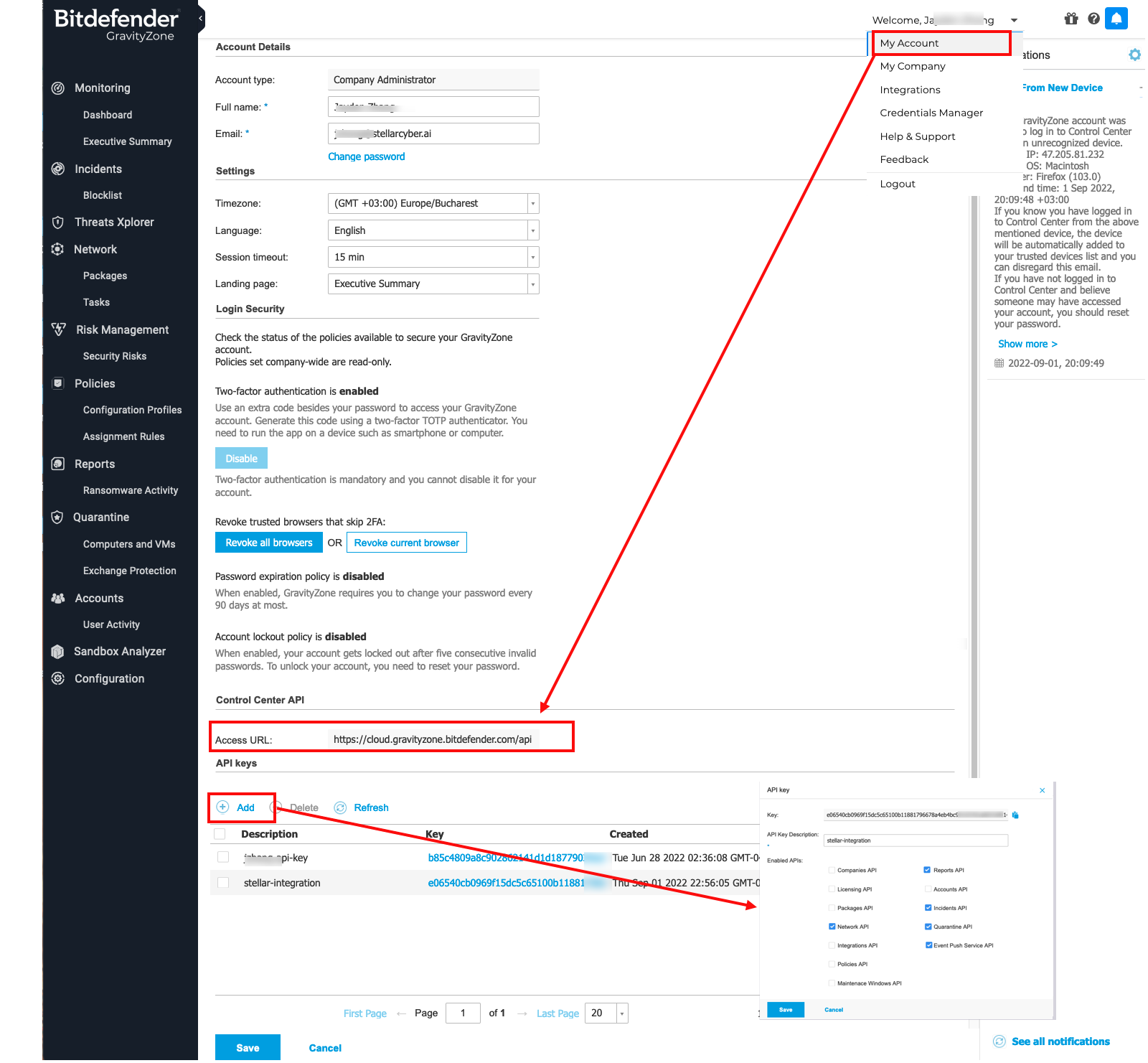
Log in to the Bitdefender GravityZone CLOUD Console as an administrative user.
-
Access your account settings.
-
Locate and save the Access URL information for use in the next section (for example:
https://cloud.gravityzone.bitdefender.com).Do not include
/apiat the end of the URL. -
Select the option to Add an API Key.
-
Create the key with at least these options:
Network API
Reports API
Incidents API
Quarantine API
Event Push Service API
-
Save the API key.
-
Locate the new key in the API keys table and save the value for use in the next section.
Configure the Bitdefender Push Script
The Python script below connects to your Bitdefender account and enables the push feature for the requested APIs. If you prefer to use a language other than Python, refer to Bitdefender's documentation.
-
Save a copy of the attached sample script to a system with Python 3 installed.
Copyset_push_sensor.py#!/usr/bin/python3
'''
This script is used to configure log push to a Stellar Cyber Sensor.
Used for non-EU region.
'''
import base64
import requests
import json
apiKey = "4f19cb...my.api.key.....554d0808921bf783b704d1b4baf03a67583f2483371"
loginString = apiKey + ":"
encodedBytes = base64.b64encode(loginString.encode())
encodedUserPassSequence = str(encodedBytes, 'utf-8')
authorizationHeader = "Basic " + encodedUserPassSequence
print('authorizationHeader', authorizationHeader)
apiEndpoint_Url = "https://cloud.gravityzone.bitdefender.com/api/v1.0/jsonrpc/push"
request = {
"params": {
"status": 1,
"serviceType": "jsonRPC",
"serviceSettings": {
"url": "https://public-ip-address-of-my-stellar-cyber-sensor:5200/httpjson_bitdefender_multiple_event",
"authorization": "Bearer sfasdfw34243",
"requireValidSslCertificate": False
},
"subscribeToEventTypes": {
"modules": True,
"sva": True,
"registration": True,
"supa-update-status": True,
"av": True,
"aph": True,
"fw": True,
"avc": True,
"uc": True,
"dp": True,
"sva-load": True,
"task-status": True,
"exchange-malware": True,
"network-sandboxing": True,
"adcloud": True,
"exchange-user-credentials": True,
"endpoint-moved-out": True,
"endpoint-moved-in": True,
"troubleshooting-activity": True,
"uninstall": True,
"install": True,
"hwid-change": True,
"new-incident": True,
"antiexploit": True,
"network-monitor": True,
"ransomware-mitigation": True,
"security-container-update-available": True
}
},
"jsonrpc": "2.0",
"method": "setPushEventSettings",
"id": "ad12cb61-52b3-4209-a87a-93a8530d91cb"
}
result = requests.post(apiEndpoint_Url, data=json.dumps(request), verify=False, headers={"Content-Type": "application/json", "Authorization": authorizationHeader})
print(result.json()) -
Locate the
apiKeyattribute in the script and replace it with the values you saved in the previous section:apiKey = "4f19cb...my.api.key.....554d0808921bf783b704d1b4baf03a67583f2483371"
-
Locate the
apiEndpoint_Urlattribute and, if needed, replace the FQDN with the value you saved for Access URL above.The example script uses the following URL:
apiEndpoint_Url = "https://cloud.gravityzone.bitdefender.com/api/v1.0/jsonrpc/push"
-
Locate the
urlattribute and replace the FQDN with the public IP address of your Stellar Cyber sensor. The sample script uses the following value:"url": "https://public-ip-address-of-my-stellar-cyber-sensor:5200/httpjson_bitdefender_multiple_event"
In the script, this
urlvalue supports multiple events in a single log payload. Stellar Cyber uses this Bitdefender-specific endpoint to parse a JSON array in one HTTP payload into multiple Interflow records.
Run the Push Script
Run the modified script from a system with Python 3 installed.
$ python3 set_push_sensor.py
The output will be similar to the following:
{'id': 'ad12cb61-52b3-4209-a87a-93a8530d91cb', 'jsonrpc': '2.0', 'result': True}
Verify the Configuration (Optional)
Optionally, use the following sample scripts to verify the configuration and data.
-
Modify the following get script to use the same
apiKeyandapiEndpoint_Urlthat you configured in the script above.Copyget_push_sensor.py#!/usr/bin/python3
''' Verify log push Settings after configuring log push to Stellar Cyber Sensor.
Use it for non-EU region
'''
import base64
import requests
import json
import urllib3
urllib3.disable_warnings()
apiKey = "4f19cb...my.api.key.....554d0808921bf783b704d1b4baf03a67583f2483371"
loginString = apiKey + ":"
encodedBytes = base64.b64encode(loginString.encode())
encodedUserPassSequence = str(encodedBytes,'utf-8')
authorizationHeader = "Basic " + encodedUserPassSequence
apiEndpoint_Url = "https://cloud.gravityzone.bitdefender.com/api/v1.0/jsonrpc/push"
request = '{"params": {},"jsonrpc": "2.0","method": "getPushEventSettings","id": "391f7b05-ec02-481b-9ed6-c07b97de2b7b"}'
result = requests.post(apiEndpoint_Url,data=request,verify=False,headers= {"Content-Type":"application/json","Authorization":authorizationHeader})
print(result.json()) -
Run the modified script from a system with Python 3 installed.
$ python3 get_push_sensor.py
The output will be similar to the following:
authorizationHeader: Basic NGYxOWNiNDk3YjMwNjQzMTQ0NGQ1NTU0ZDA4MDg5MjFiZjc4M2I3MDRkMWI0YmFmMDNhNjc1ODNmMjQ4MzM3MTo=
{'id': '391f7b05-ec02-481b-9ed6-c07b97de2b7b', 'jsonrpc': '2.0', 'result': {'serviceSettings': {'authorization': '********', 'requireValidSslCertificate': False, 'url': 'https://public-ip-address-of-my-stellar-cyber-sensor:5200/httpjson'}, 'serviceType': 'jsonRPC', 'status': 1, 'subscribeToEventTypes': {'adcloud': True, 'antiexploit': True, 'aph': True, 'av': True, 'avc': True, 'dp': True, 'endpoint-moved-in': True, 'endpoint-moved-out': True, 'exchange-malware': True, 'exchange-user-credentials': True, 'fw': True, 'hd': False, 'hwid-change': True, 'install': True, 'modules': True, 'network-monitor': True, 'network-sandboxing': True, 'new-incident': True, 'ransomware-mitigation': True, 'registration': True, 'security-container-update-available': True, 'supa-update-status': True, 'sva': True, 'sva-load': True, 'task-status': True, 'troubleshooting-activity': True, 'uc': True, 'uninstall': True}}}
The subscribed event types are enabled with the API options you specified when you created the API key. Verify that the services you want to log are enabled with
True.In the script, the
urlvalue uses the generic HTTP JSON parser. Stellar Cyber parses the HTTP payload as a single JSON-formatted Interflow record. -
You can also verify the statistics are pushed, with the following script.
The
getscript uses the sameapiKeyandapiEndpoint_Urlvalues you configured in the script above.Copyget_push_event_stats.py#!/usr/bin/python3
import base64
import requests
import json
apiKey = "4f19cb...my.api.key.....554d0808921bf783b704d1b4baf03a67583f2483371"
loginString = apiKey + ":"
encodedBytes = base64.b64encode(loginString.encode())
encodedUserPassSequence = str(encodedBytes,'utf-8')
authorizationHeader = "Basic " + encodedUserPassSequence
print('authorizationHeader', authorizationHeader)
apiEndpoint_Url = "https://cloud.gravityzone.bitdefender.com/api/v1.0/jsonrpc/push"
request = '''
{
"params": {},
"jsonrpc": "2.0",
"method": "getPushEventStats",
"id": "ad12cb61-52b3-4209-a87a-93a8530d91cb"
}
'''
result = requests.post(apiEndpoint_Url,data=request,verify=False,headers= {"Content-Type":"application/json","Authorization":authorizationHeader})
print(result.json()) -
Run the modified script from a system with Python 3 installed.
$ python3 get_push_event_stats.py
The output will be similar to the following:
{
    "id": "ad12cb61-52b3-4209-a87a-93a8530d91cb",
    "jsonrpc": "2.0",
    "result": {
        "count": {
            "errorMessages": 3,
            "events": 22,
            "sentMessages": 10,
            "testEvents": 2
        },
        "error": {
            "configurationError": 0,
            "connectionError": 3,
            "serviceError": 0,
            "statusCode2xx": 0,
            "statusCode300": 0,
            "statusCode400": 0,
            "statusCode500": 0,
            "timeout": 0
        },
        "lastUpdateTime": "2022-09-07T02:31:26"
    }
}
