Upload a Custom Parser Provided by Customer Success
Root-level users
Stellar Cyber ingests data from many different sources and processes it through parsers that convert raw log messages into normalized fields. Parser Studio is the preferred method for creating and managing these custom parsers. In some cases, Stellar Cyber Customer Success might provide a custom parser for your environment. This topic explains how to upload the files for a custom parser.
If Customer Success asked you to provide sample logs for a parser already being handled through support, follow the guidance in Configuring Generic Log Capture.
Use the following procedure only if Customer Success has already provided a pair of parser files. To add the parser, upload the files through Parser Studio.
Before You Upload
Confirm the following before starting:
 Legacy custom parser
-
Parser file (.json) – Defines how raw log text is parsed into structured fields. This is provided by Stellar Cyber Customer Success.
-
Configuration file (.conf) – Defines how the sensor receives and routes logs. This is also provided by Stellar Cyber Customer Success.
-
The name of the tenant for whom the custom parser was created.
-
The
cust_idvalue in the routing step of the configuration file matches the Stellar Cyber tenant ID for the tenant to which you are uploading the parser. A mismatch causes an error and the upload will not proceed. You can find a tenant ID on the Tenants page (System | ORGANIZATION MANAGEMENT | Tenants).
Modular custom parser – Early Access Program (EAP) only
-
Parser file (.json) – Configuration file provided by Stellar Cyber Customer Success.
-
The name of the tenant for whom the custom parser was created.
-
The port number specified in the routing step falls in the range 1 – 65535 and does not conflict with an existing custom parser.
An uploaded modular custom parser is disabled by default, so even if an existing custom parser is already using the same port, Stellar Cyber doesn't reject the new parser when it's uploaded. However, it will reject the parser if there's still a conflict when it's enabled. Because custom parsers take precedence over built-in parsers, if you assign a custom parser to the same port as a built-in parser, Stellar Cyber automatically disables the built-in parser to let the custom parser use the port.
The port range is 1 – 65535 when uploading modular custom parsers. The port range is 7000 – 8000 when cloning parsers.
-
(Optional, if using Tenant Mapping) A tenant map configured for the target tenant. The tenant map must exist in Tenant Mapping (System | ORGANIZATION MANAGEMENT | Tenant Mapping) before you configure the parser.
Upload Steps
-
Navigate to System | DATA SOURCE MANAGEMENT | Parser Studio | Parsers and select + Create Parser.
-
(EAP only) Select Upload Custom Parser and in Select the type of custom parser you want to upload, select Legacy Parser or Modular Parser.
Do this only if you are participating in the Early Access Program (EAP). Otherwise skip this step.
-
In Tenant, choose the tenant for which you are creating the parser.
This must be the tenant whose ID matches the
cust_idvalue in the routing step of your configuration file. -
Either upload two files for a legacy custom parser or one file for modular custom parser (EAP only).
Legacy Custom Parser
Select Upload Parser File, navigate to your JSON file, and select it.
Select Upload Configuration File, navigate to the CONF file, and select it.
Legacy Custom Parser Upload (EAP)
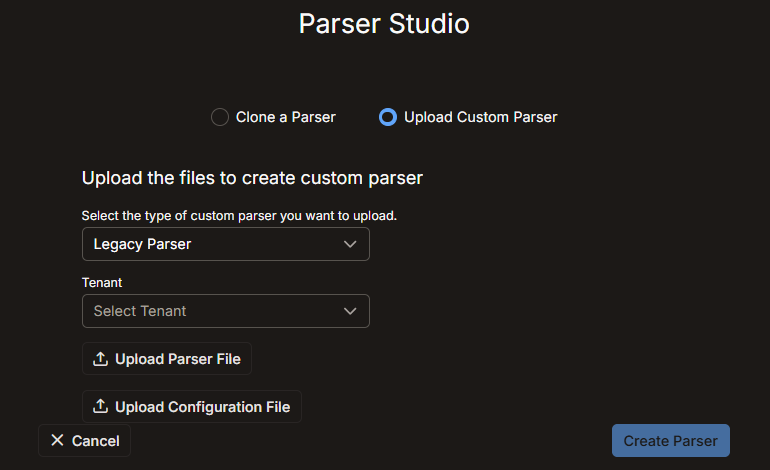
Legacy Custom Parser Upload
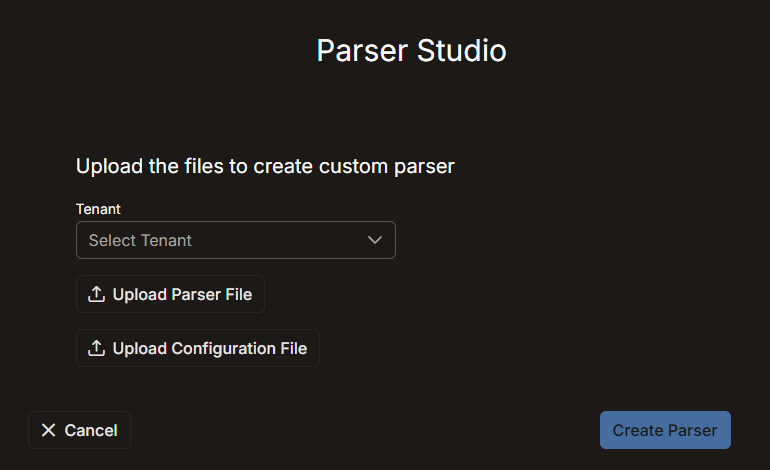
Modular Custom Parser
Select Upload Parser File, navigate to your JSON file, and select it.
Modular Custom Parser Upload (EAP)
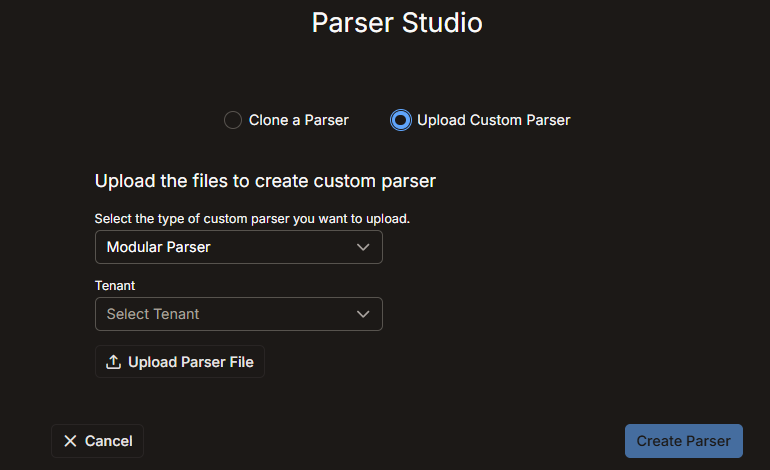
-
Select Create Parser.
If the upload succeeds, Stellar Cyber adds the parser to the Parser Studio table.
If the upload fails, an error message explains the reason. The most common cause is a mismatch between the
cust_idin the routing step in the configuration file and the Stellar Cyber tenant ID of the selected tenant. If this occurs, open the CONF file, locate thecust_idfield in the routing step, and replace its value with the correct tenant ID. Save the file and repeat the upload. -
After a successful upload, review the parser in the table and confirm the following:
-
The parser name clearly identifies its purpose.
-
The assigned port does not conflict with another custom parser.
-
The parser is configured for the correct tenant.
-
The custom parser status is enabled. (All legacy custom parsers are enabled and cannot be disabled.)
-
