Managing Sources of Institutional Knowledge
Institutional Knowledge originates from justifications that you and your team submit when overriding an Alert Auto Triage verdict. Stellar Cyber saves each justification as a source record and consolidates source records into the knowledge entries it applies during triage. The Source of Institutional Knowledge page lists these records, including the justification, the submitting analyst, and the associated alert.
Manage knowledge through its sources. Renew records that remain accurate and delete those that no longer apply. To see the knowledge built from these records, and to pause it, see Managing Institutional Knowledge.
The following are the sections in this topic:
Viewing the Sources of Knowledge
The Source of Institutional Knowledge page lists the justifications submitted with verdict overrides. Use it to review the submitted feedback and manage the lifecycle of each record.
To view the sources of knowledge:
-
Navigate to System | DATA MANAGEMENT | Source of Institutional Knowledge.
-
Select the Override Justification tab.
-
Select More to expand the justification and any additional context. Select Less to collapse them.
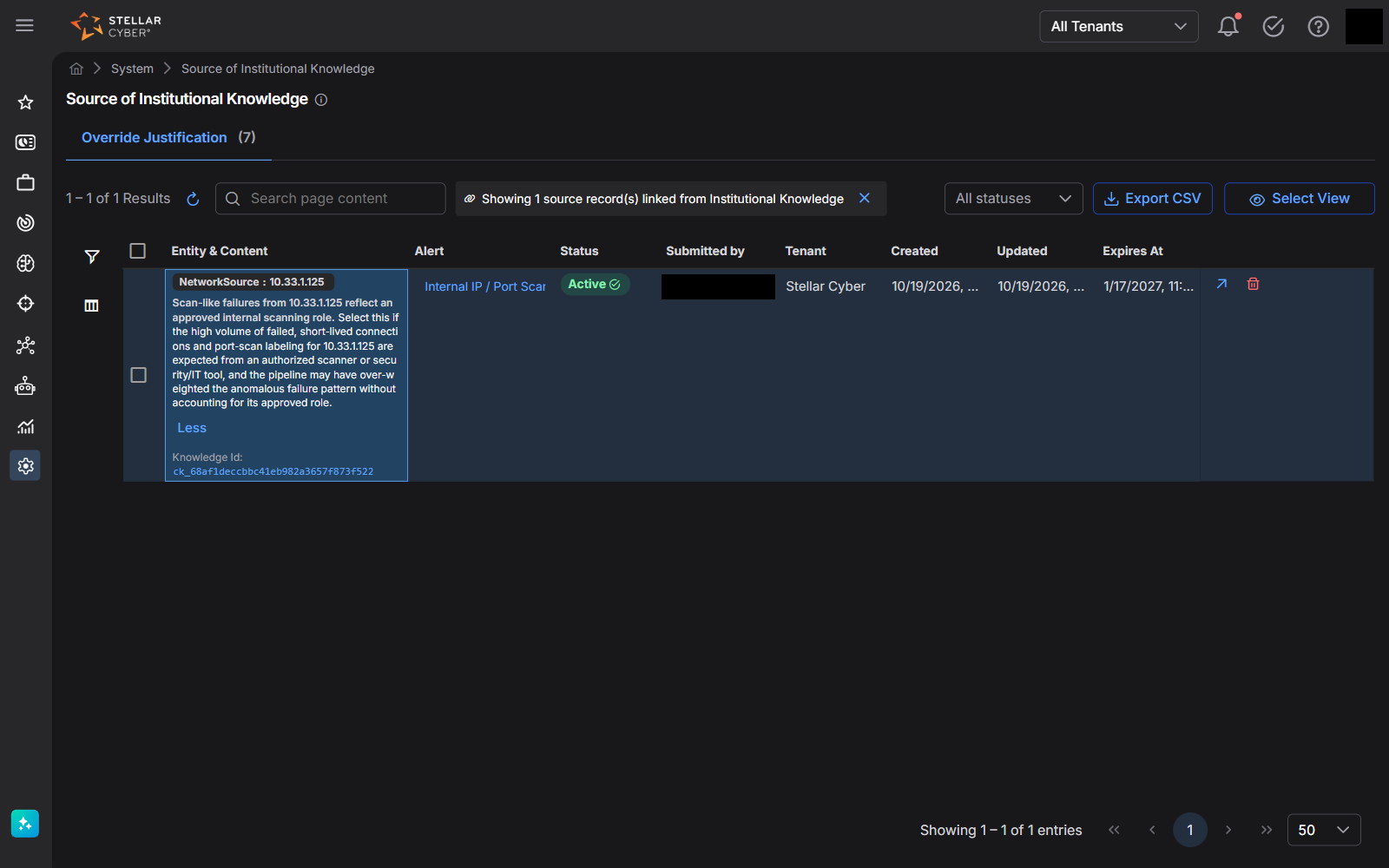
The Override Justification tab includes the following columns:
|
Column |
Description |
|---|---|
| Entity & Content | The alert observables, the selected or written justification, and any additional context. The Knowledge Id below the content links to the knowledge entry that the record contributed to. This field is empty until Stellar Cyber has processed the record. |
| Alert | The alert whose verdict was overridden. |
| Status | The record status: Active, Expiring soon, or Expired. While a change is being processed, the status indicates a pending action, such as Pending or Pending delete, and some actions are unavailable. |
| Submitted by | The analyst who submitted the justification. |
| Tenant | The tenant the record belongs to. |
| Created and Updated | When the justification was submitted and the record was last updated. |
| Expires At | When the record expires and stops supporting knowledge, unless it is renewed. |
You can also do the following on this tab:
-
Enter text in the Search page content box to find records by content.
-
Select the filter icon to filter records by Tenant, Created, Updated, Expires At, Entity type, or Entity value.
-
Use the status list (All statuses, Active, Expiring soon, Expired) to show records in a particular state.
-
Select Select View to show, hide, or reorder columns.
-
Select Export CSV to download the records shown in the table.
Tracing Knowledge to Its Sources
To see the feedback behind a knowledge entry:
-
On the Institutional Knowledge page, expand the entry.
-
Select Open in Source of Institutional Knowledge.
The Source of Institutional Knowledge page opens in a new browser tab and displays only linked records, with a banner such as Showing 1 source record(s) linked from Institutional Knowledge. Select X on the banner to clear the filter and show all records.
To navigate from a source record to the corresponding knowledge entry, select its Knowledge Id or the View in Institutional Knowledge icon in its row.
Managing the Lifecycle of Knowledge
Environments change, and previously accurate knowledge can become outdated. Stellar Cyber applies an expiration to every source record to prevent knowledge from remaining active indefinitely without review. Manage knowledge through its source records. Renew records that remain valid and delete those that no longer apply.
How Expiration Works
When you override a verdict, you choose how long the context applies under How long does this context apply?: the Default (90 days, renewable on expiry) or a Custom end date. When that date passes:
-
The source record status changes to Expired, and it no longer supports any knowledge entry. The record remains on the Source of Institutional Knowledge page.
-
Stellar Cyber stops applying knowledge built only from that record.
The Expires At value for a knowledge entry depends on its source records:
-
An observable entry expires when its source record expires.
-
A tenant entry built from several records expires when the earliest of those records expires. Stellar Cyber then rebuilds the entry from the records that are still active.
To find records approaching expiration, select Expiring soon in the status list on the Source of Institutional Knowledge page.
Renewing Knowledge
If the context remains valid, renew the source record so that Stellar Cyber keeps applying it.
To renew source records:
-
Navigate to System | DATA MANAGEMENT | Source of Institutional Knowledge.
-
In the status list, select Expiring soon or Expired.
-
Choose one of the following options:
-
For one record, select the Renew icon for the record.
-
For multiple records, select the check boxes or all results, and then select Renew selected.
-
-
In the Renew record dialog box, under How long should this knowledge stay active?, choose 90 days, 180 days, 365 days, or Custom date, and then select Renew.
Stellar Cyber updates the Expires At date for the record and rebuilds the related knowledge the next time it processes Institutional Knowledge. The Renew action is not available while a record is pending another change.
Deleting Knowledge
Delete a source record if its justification is incorrect or no longer applies. You can delete individual records or multiple records.
To delete source records:
-
Navigate to System | DATA MANAGEMENT | Source of Institutional Knowledge.
-
Choose one of the following options:
-
For one record, select the Delete icon for the record.
-
For multiple records, select the check boxes or all results, and then select Delete selected. You can delete up to 200 records at a time.
-
-
In the Delete this knowledge record? dialog box, select Delete.
The record status changes to Pending delete. The next time Stellar Cyber processes Institutional Knowledge, it rebuilds each affected knowledge entry from the remaining records, or removes the entry if no records remain.
Deletion cannot be undone. To stop all knowledge from influencing triage immediately, for example while you clean up incorrect feedback, turn off the knowledge toggle as described in Pausing Institutional Knowledge.
Deleting a record does not change verdicts for previously triaged alerts.
For how knowledge is built and applied, see Managing Institutional Knowledge. For how to override a verdict and write an effective justification, see Providing Feedback to Alert Auto Triage.
